
This is a step-by-step guide to building your TAM with Claude Code: a database of every company that could buy from you.
We’ll go through one example: every IT service company in the US with 11 to 250 employees.
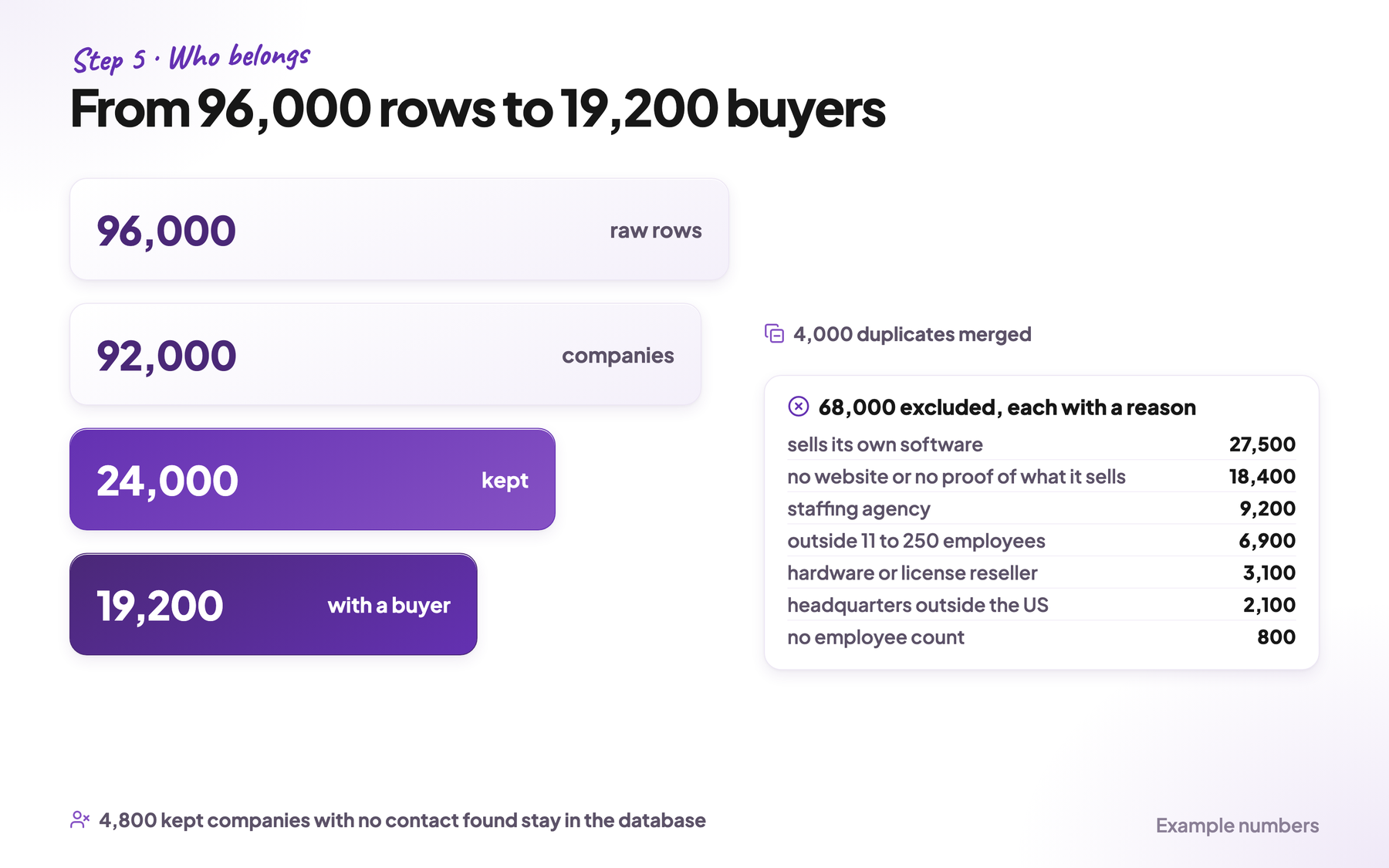
Say the pull, the download of every matching company from a database, returns 96,000 rows. After cleaning, 92,000 companies are left. 24,000 of them fit the market, and 19,200 of those have a person you can contact.
This guide is for founders, GTM (go-to-market) engineers and anyone who builds lead lists for markets where most companies have a LinkedIn page: software, IT services, agencies and other B2B services.
If your market is local businesses on Google Maps, my TAM playbook for local businesses covers that case. If you already have a raw pull on disk, skip to step 4.
Why you pull companies before people
A contact database answers one question: who can I email? You filter it by job title and country, and you get people. But you only see the companies where the database has someone with that title. The other companies never show up, and you can’t tell how many there are.
When you pull the companies first, you know the full count. Say your market has 24,000 companies and you find a contact at 19,200 of them. That’s 80% of the market. The other 4,800 become a separate list you can work on with other sources, instead of a gap nobody sees.
You also get a real answer when someone asks how big the market is and how much of it you can reach.
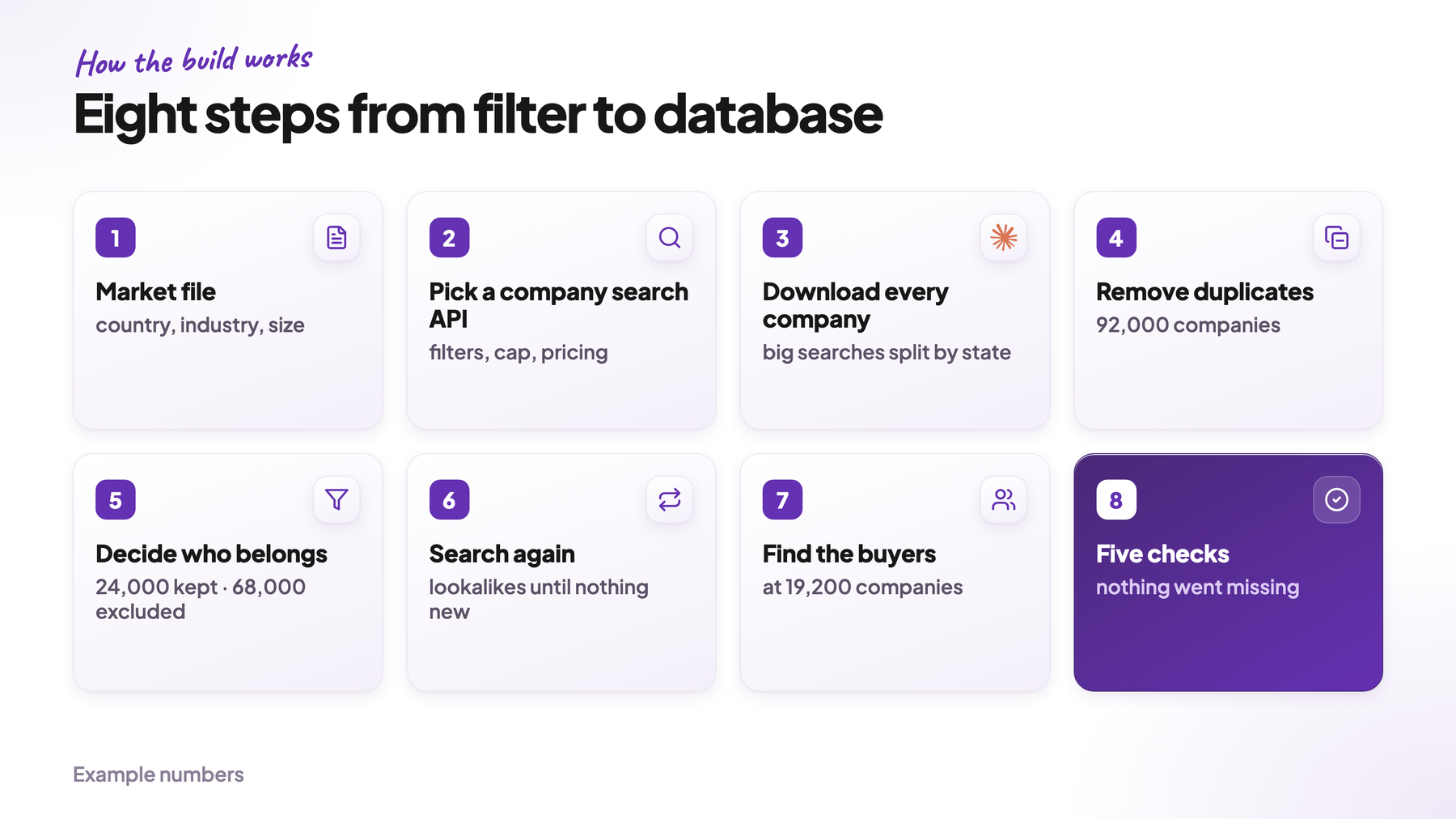
The build has eight steps. Steps 1 to 3 pull the raw data. Steps 4 and 5 clean it and decide which companies fit. Step 6 searches again until nothing new turns up, step 7 finds the people, and step 8 checks that nothing went missing.
1. Define your market before you download anything
Three criteria define your market: the country of the headquarters, what the company does, and how many people work there. Write them into a file before the first API call. I call it the market file.
The order matters. If you widen the industry filter on day two, part of your data was pulled under different rules. Then you can’t tell which companies are missing.
Pull wider than you sell. Most databases sort companies into fixed size ranges, like 11 to 50, 51 to 200 and 201 to 500 employees. A market of 11 to 250 employees cuts through the 201 to 500 range. So you pull every range that touches your market and cut on the exact employee count later.
Use every industry label your customers have. Companies choose their own label on LinkedIn, and many choose an odd one. Look up 10 of your best customers and write down their labels. Pull every label that at least one of them has.
Write one yes/no question every company has to pass. In step 5, an AI model asks this question about every company. In the example: “Does this company sell IT projects or managed IT services to other businesses?”
List the companies that look right but aren’t. A search for IT services also finds software companies, staffing agencies and hardware resellers. Write them under the question, so the AI answers no for them.
For the example, the market file looks like this:
market: it-services-us
customers: [the website domains of your 10 best customers]
geography: [US]
employees: [11, 250]          # pull 11-50, 51-200 and 201-500, cut later
industries:                   # every label one customer has
  - IT Services and IT Consulting
  - Computer and Network Security
  - Software Development
question: Does this company sell IT projects or managed IT
          services to other businesses?
yes: IT service providers, IT consultancies, managed service providers
no:  software product companies, staffing agencies,
     hardware or license resellers
titles: [Owner, Founder, CEO, President, VP of Sales, CTO]
Every company either passes or is excluded with its reason. Excluded companies stay in the database, so you can always see why a company is not on the list.
2. Pick a company search API
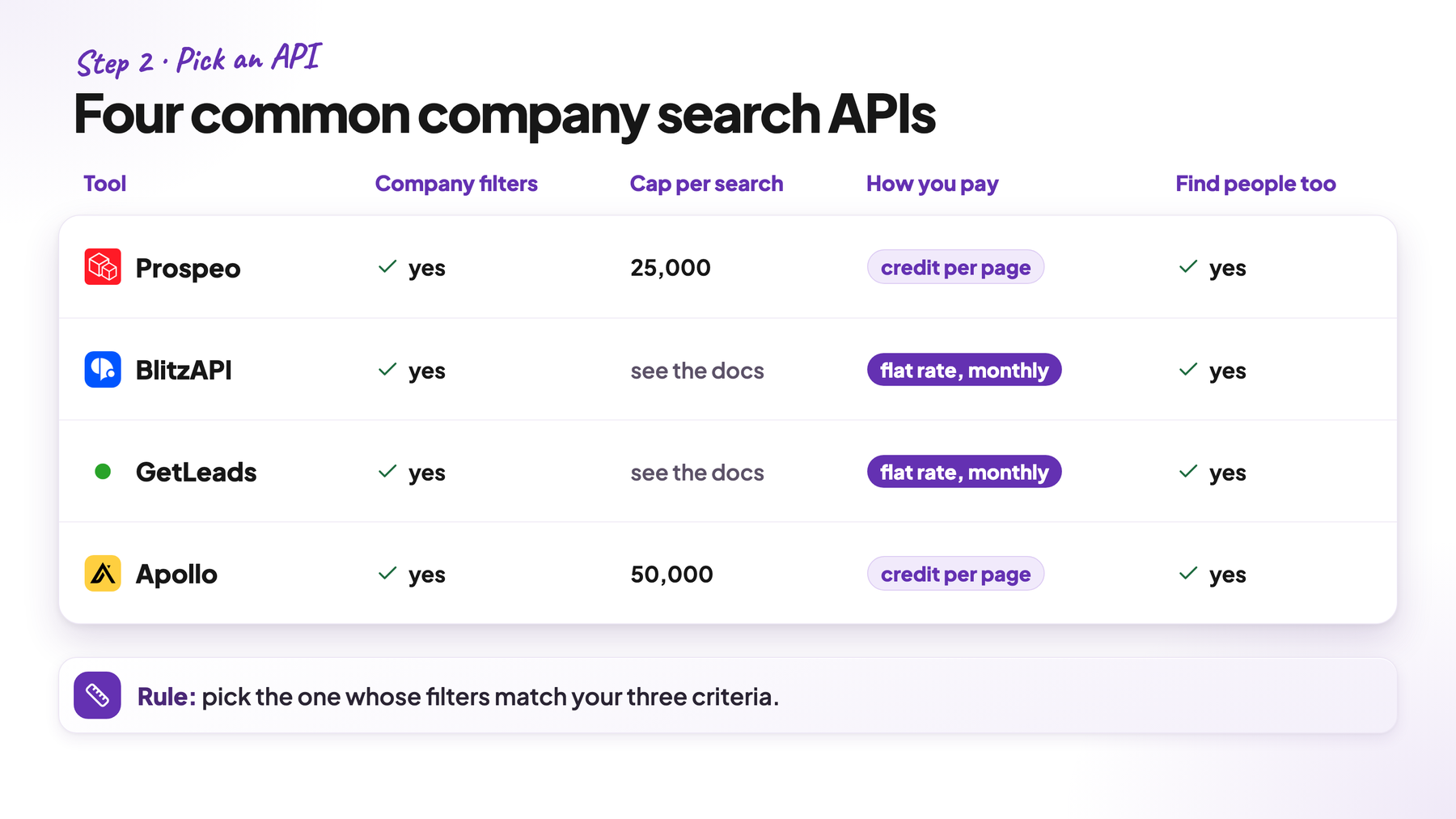
An API lets a script ask a database for data. Four common options for company search are Prospeo, BlitzAPI, GetLeads and Apollo. All four are databases of companies and people. Four things decide which one fits this job:
- Filters that match your criteria. Country of the headquarters, industry and company size as real filters.
- The cap per search. Most APIs stop at a fixed number of results per search. Prospeo’s company search stops at 25,000 results, and Apollo shows at most 50,000. Bigger searches have to be split into smaller ones.
- How you pay. BlitzAPI and GetLeads are flat rate: one fixed price a month instead of a price per contact. Prospeo and Apollo charge one credit, a prepaid unit, per page of results.
- IDs in every record. You need at least the website domain and the LinkedIn URL, or removing duplicates gets hard.
I’d pick the API whose filters match your three criteria most directly. If you’re unsure, pick a flat-rate API, because you’ll use the same one again in step 7 to find the people.
These databases lean heavily on LinkedIn data. A family-run company without a LinkedIn page may be in none of them. There’s a separate guide on finding those companies.
3. Let Claude Code download every company
Sign up with the API you picked and copy your API key, the password your script uses, from its settings page. Create a new folder with two files: market.yaml, the market file from step 1, and .env with one line, for example PROSPEO_API_KEY=your-key.
Then open the Terminal, go to the folder and type claude to start Claude Code. Press Shift+Tab to switch to plan mode. In plan mode, Claude Code first proposes the design and only writes code after you agree.
The prompt below makes the script do four things, all taken from how Eric Nowoslawski builds lists:
- Split big searches. Each search covers one industry label and one size range. If a search has more results than the API returns at once, the script splits it by state.
- Save everything. Every page of results is saved unchanged, so a later bug never means downloading again.
- Resume after a crash. If the run stops at 2 a.m., you restart it and it continues where it stopped.
- Stop on errors. After three failures in a row, the run stops and tells you which search failed.
Here’s the prompt I’d paste:
Read market.yaml and the API docs at <link to the docs>.
Build tools/pull_companies.py.

Searches: one search per industry label x size range, always filtered by
the geography. Use every label under industries and every size range
that touches the employee range (11-50, 51-200, 201-500). For each search,
request the first page and read the total result count. If the total is
above the cap per search (<cap>), split the search by state until every
search fits.
Write all searches to searches.csv with: search_id, filters, reported_total, status.

Raw storage: save every API response unchanged to
raw/<search_id>/page_<n>.json. Never parse or filter during the pull.

Resume: before any request, skip pages that already exist on disk.

Parallel: 4 workers, one shared rate limit at 80% of the documented limit.
Wait and retry on errors 429 and 5xx. Stop the whole run after
3 failures in a row and print which search failed.

Guards:
- Before the run, print the number of searches, the expected pages and
  the expected credits, then wait for my yes.
- If a filtered search reports the same total as the search without
  the filter, stop. The filter was ignored.
- If a search returns exactly the cap, mark it as cut off.

Test on one search with 2 pages first and show me one raw file.
Replace <link to the docs> with the address of the API documentation, and <cap> with the most results one search returns. If you can’t find the cap, ask Claude Code to look it up in the docs.
Read the first raw file yourself before the full run. Check that the country and the employee count in each row match the search. This one look catches a broken filter before it costs you a full run.
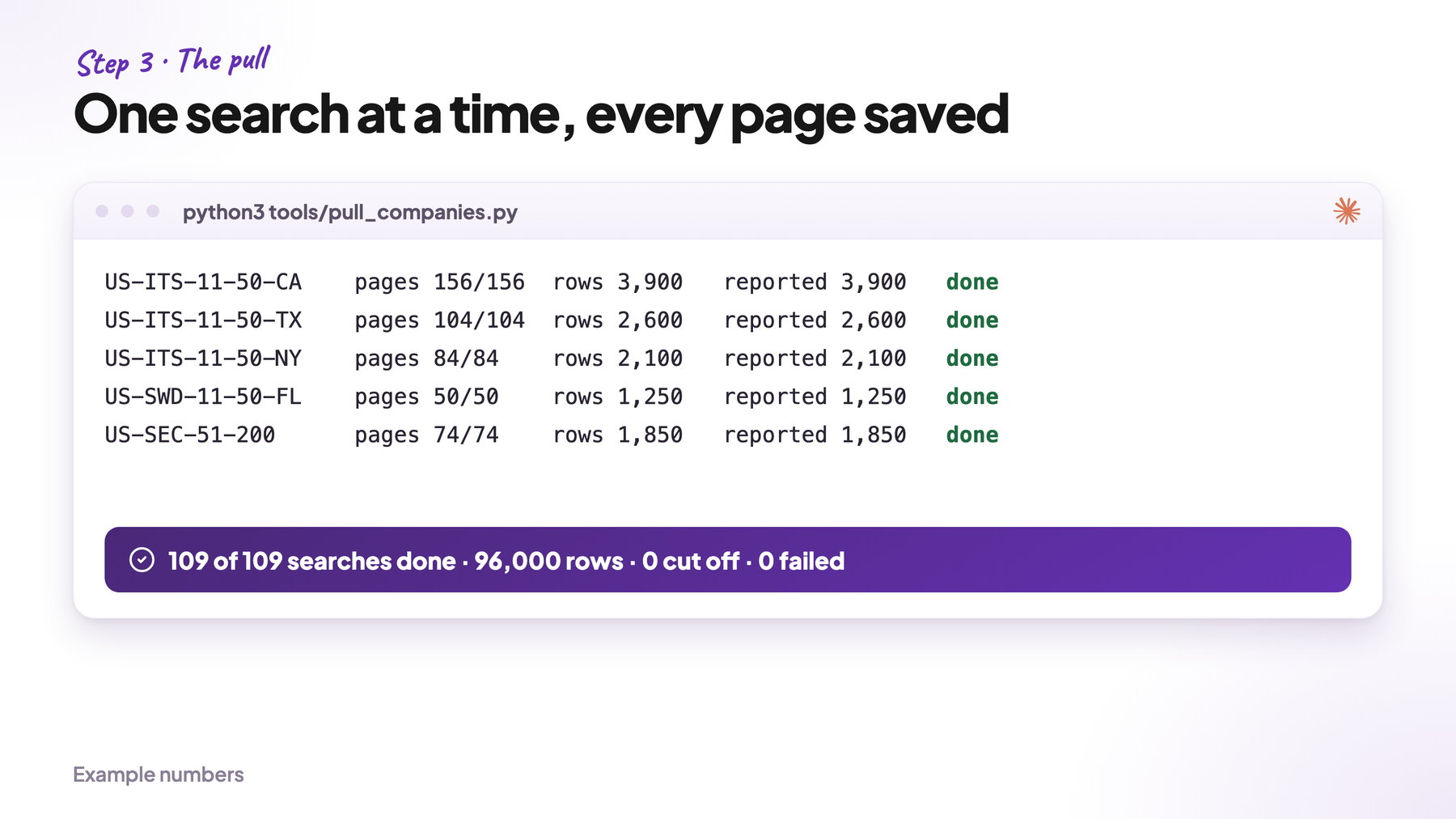
In the example, the first plan has 9 searches: 3 industry labels × 3 size ranges. Say your API stops at 25,000 results per search.
Two searches report more than that: IT Services × 11 to 50 employees with 31,400 results and Software Development × 11 to 50 with 27,900. So the script splits those two by state, 50 states plus Washington, D.C. That makes 109 searches, and the full run saves 96,000 raw rows.
On a Mac, start a long run as caffeinate -i python3 tools/pull_companies.py. That keeps the laptop awake until the script ends.
4. Remove duplicates
Raw rows aren’t companies yet. The same company shows up twice when the database changes while you download it page by page. It also shows up twice when it has one LinkedIn page per country and one website for all of them.
Match duplicates in this order:
- Website domain. Lowercase it and remove the “http” part, “www.” and everything after the first slash.
- LinkedIn company ID, for rows without a domain.
- Name plus city, both cleaned, only for the rows that are left.
Keep one record per company. Fill its empty fields from the duplicates and save which searches it came from. Never match on the name alone, because many unrelated companies share generic names.
Paste this into Claude Code:
Build tools/dedupe.py. Read every file in raw/ and write companies.csv
with one row per company. Match duplicates in this order: website
domain (lowercase, without http, www. and everything after the first
slash), then LinkedIn company ID, then cleaned name plus city.
Merge the fields of duplicates into one row and keep a column with
every search_id the company came from. Print rows in and companies out.
In the example, the 96,000 raw rows become 92,000 companies.
5. Decide which companies belong to your market
Now apply the market file: the employee range, the geography and the question. Every company is either kept or excluded, always with a reason.
Let code make the number cuts. An employee count between 11 and 250 and a headquarters in the US are simple comparisons. A Python script does them. Don’t let a model count.
Have AI check everything else. The hard question in this example is services or product. The label “Software Development” holds custom software shops and SaaS companies (companies that sell their own software as a subscription) alike. So an AI model reads the description and the website of every remaining company and answers the question from step 1, with the companies under “no” as reasons to say no. Claude Code writes the script that downloads each website’s text and sends it to the model with your question.
Check every company, not a sample. A sample leaves the mistakes in the rest on your list. Here’s the prompt the model gets for each company:
You are checking one company for a market list.

Question: Does this company sell IT projects or managed IT services
to other businesses?
Yes: IT service providers, IT consultancies, managed service providers
No: software product companies, staffing agencies, hardware or
license resellers

Input: name, LinkedIn description, website text (first 4,000 characters)

Return: answer (yes / no / unclear), the exact sentence from the
input behind the answer, and the "No" item that applies.
Use only the input. If the text doesn't say it, answer unclear.
An “unclear” answer means the website gives no proof, so the company is excluded with that reason.
Test the prompt on companies you already know. Before the full run, label a few dozen companies by hand: your customers as yes, the companies under “no” as no. Run the prompt on them and fix it until it agrees with you. Then run it on every company. My TAM playbook shows this step in detail.
In the example, the 92,000 companies split into 24,000 kept and 68,000 excluded. Most excluded companies sell their own software (27,500) or have no working website or no proof of what they sell (18,400). The rest are staffing agencies (9,200), companies outside the range of 11 to 250 employees (6,900), hardware or license resellers (3,100), companies with their headquarters outside the US (2,100) and companies without an employee count (800).
6. Search again until nothing new turns up
Your first search only finds companies with the industry labels you picked. Some companies in your market chose a different label, so they never showed up.
Run a lookalike search to find them. You give a tool like Prospeo, Exa or Ocean.io the companies you already kept. It returns companies that look similar, whatever label they chose. Remove every company you’ve already checked and run the new ones through the same question from step 1.
Repeat until a round brings almost nothing new. A good rule: stop when a round adds less than 3% new companies that pass your question. Set a budget limit too, so the search doesn’t run forever.
Build tools/lookalikes.py. Send the kept companies from companies.csv
to the lookalike search of <tool> in batches. Remove every result
whose domain is already in companies.csv. Run the new companies
through the same check as step 5 and add them with status and reason.
Print new companies found and new companies kept for each round.
Stop when a round keeps less than 3% new companies or when the
budget of <credits> is used up.
7. Find the people who buy
Only now do you look for people, and only at the companies you kept.
Pull everyone with the right titles, not one person per company. Use the titles from your market file and pull every person with one of those titles at every kept company. Start with GetLeads and BlitzAPI, because both are flat rate. Use Prospeo last, because you pay per contact there.
For this market, I’d search for these title groups:
- Owner, Founder, CEO, President
- VP of Sales, Head of Sales, Director of Business Development
- CTO, VP of Engineering, Head of Managed Services
Check three things before you trust the results:
- Which field the title filter reads. It may read the current job title or the LinkedIn headline. If it reads the headline, a managing director whose headline says “Helping companies move to the cloud” never shows up.
- Combined titles. At small US companies one person often holds two titles, like “Co-Founder & CEO” or “Owner / Principal Consultant”. Match each title word anywhere in the field. A filter for the exact title “CEO” misses both.
- Titles to exclude. “Assistant to the CEO”, “Office Manager” and “Chief of Staff” contain your keywords but are rarely the buyer. Put them on an exclude list.
The databases also lag behind. Someone who changed jobs last month may show up at the old company.
In the example, 19,200 of the 24,000 kept companies have at least one person with a buying title. The other 4,800 stay in the database with the status “no contact found”, because they’re part of the market.
Remove the companies you shouldn’t contact. Before you buy a single email, take out your current customers, open deals and everyone who asked not to be contacted. Match them on the website domain against your CRM.
Emails come next. Remove duplicate people first, so you never pay twice for the same person.
Most companies build their email addresses the same way. For a person called John Smith at company.com, the address is usually john.smith@company.com, john@company.com or jsmith@company.com. So build these three addresses for every person and check them with an email verifier like MillionVerifier. A verifier asks the company’s mail server whether the mailbox exists, without sending an email. Keep the first address that comes back valid.
This is the cheapest way to find emails, because a check costs a fraction of a cent. Pay an email finder like Prospeo or LeadMagic only for the people none of the three addresses works for.
A verifier returns one of four answers: valid, invalid, unknown or catch-all. Only keep the valid ones. Drop every “unknown”, because the verifier couldn’t confirm the mailbox. Catch-all addresses come from mail servers that accept any address, so the cheap verifier can’t confirm them. Switch to a second tool like LeadMagic or BounceBan for this group and send only to the ones it confirms. That extra check pays off: most senders drop catch-alls, so those people get far fewer cold emails.
Which of these companies you contact first is a separate decision. Start with the ones that show a signal, a sign they may need you right now, like a new job post or a new office.
8. Check that nothing went missing
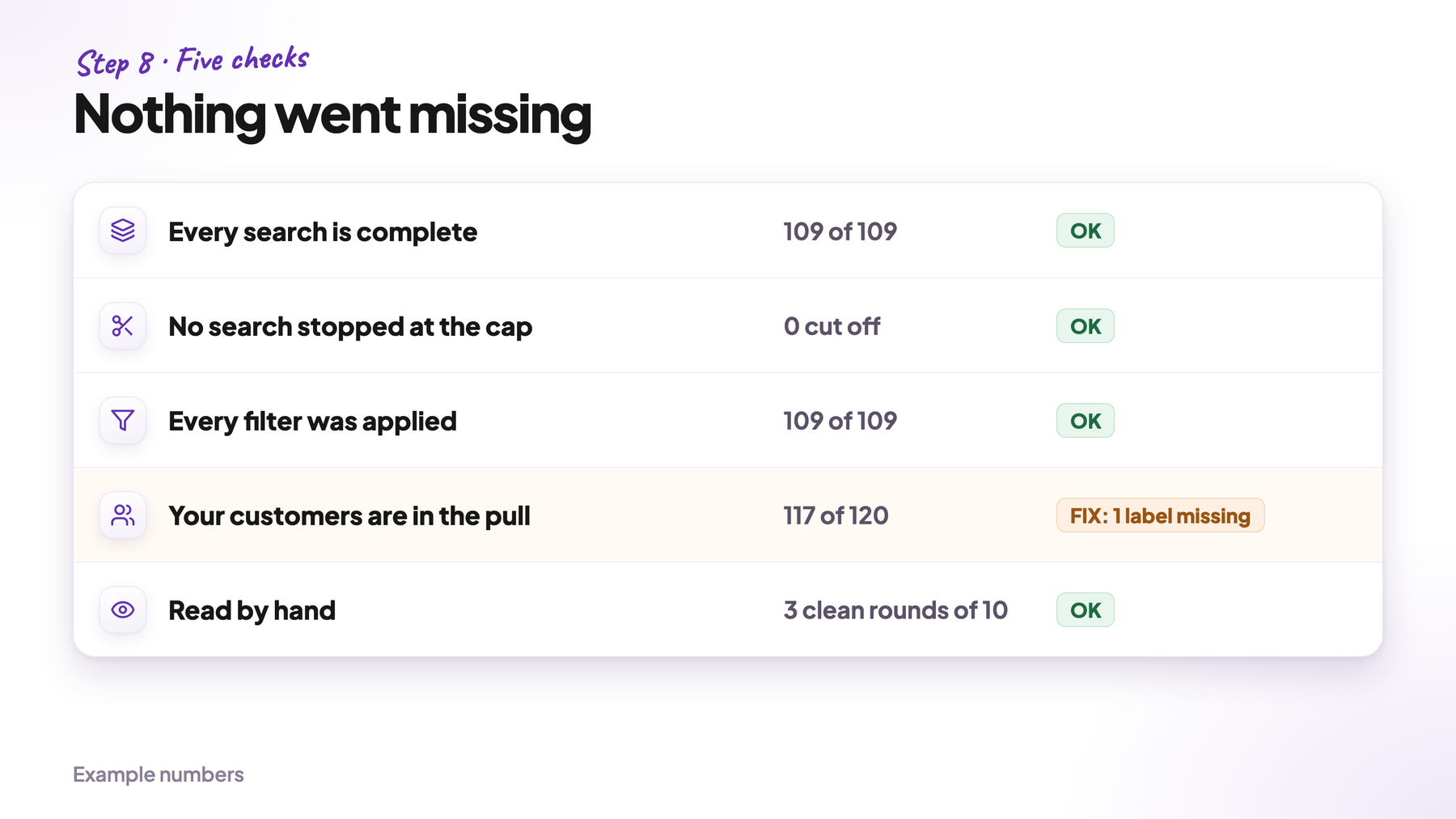
A pull can lose companies without any error message. Five checks catch it:
- Every search is complete. The pages on disk match the total the API reported for that search.
- No search stopped at the cap. A search that returned exactly the cap was cut off. Split it and pull it again.
- Every filter was applied. Some APIs ignore a filter they don’t recognize and return the whole database without an error. So each filtered search must report fewer results than the same search without the filter.
- Your customers are in the pull. Every customer that fits the market should be in the database. Each one that’s missing points to a filter or a label you got wrong. If your market has an official register, like banks or schools, compare against it too. IT services has no register with names, but the Census counts 23,851 US offices of IT service companies with 10 to 249 employees (2022). One company can have several offices, so your count should land near that number, not at three times it.
- Ten rows read by hand. Open each website and compare the size and what the company sells with your data. If a row is wrong, fix the rule that let it through and pick ten new rows. The list is ready when three rounds of ten in a row come back clean.
Have Claude Code write the first four as one script:
Build tools/checks.py. It reads searches.csv, the raw/ folder,
companies.csv (one row per company with status and reason)
and customers.csv (the website domains of our customers).

Print one row per check: check, expected, actual, OK or FAIL.
1. For every search: pages on disk == reported total / page size,
   rounded up.
2. No search returned exactly the cap.
3. No filtered search reports the same total as the search
   without the filter.
4. Every customer domain is in companies.csv. List the missing ones
   with the industry label each one has on LinkedIn.
5. Write 10 random kept rows to sample.csv for the check by hand.

Exit with code 1 if a check fails and print the rows that cause it.
Never change a number to make a check pass.
When a check fails, look in the raw files first. Usually a search stopped early or a filter was ignored.
Keep the database up to date. Save every AI answer with the domain and the version of the prompt, so the next run only checks companies that are new or changed. Run the download again every few months and compare it with the last one. The new companies are your freshest leads.
Say 3 of your 120 customers are missing from the example pull. All three use an industry label you didn’t pull. You add the label to the market file, pull it as new searches and run the checks again.
Four mistakes to avoid
- Changing the market file in the middle of the build. Say you add an industry label on day two. The companies you downloaded on day one were found without it. Download the new label as separate searches, mark them as added later, and run the checks from step 8 again.
- Letting the AI do the math. The AI writes the scripts and decides what each company sells. Counting, cutting by numbers and checking always happen in code, because a script counts the same way every time.
- Trusting a search that returns zero. Zero results can mean there are no companies there. It can also mean a filter broke. Open the raw file and look before you accept it.
- Calling your count the whole market. Your count only includes companies your database knows. When you share the number, say how many companies you excluded because data was missing, and that companies without a LinkedIn page aren’t in it.
Where to start today
You can start your market database today in three steps:
- Write your market file. Give Claude Code the websites of your 10 best customers and let it fill in the file from step 1: geography, size, industry labels and the yes/no question.
- Download every company that could fit. Let Claude Code write the script from step 3, which splits big searches by state. Then remove the duplicates.
- Let AI check and qualify them. Run the question on every company. The companies that pass are your market.

