You’ve set up Claude Code, and now every tool in your stack offers an MCP server. Lists of the best Claude Code MCPs usually rank them by popularity. This guide sorts them by the job a GTM team needs done: the CRM, prospect data, web research, and the inbox and team tools. For each one you get what it can read, what it can write and the command to add it.
GTM (go-to-market) means everything that brings in new customers: the market list, outreach, follow-up and the CRM. All servers below are run or published by the tool’s own vendor, and every capability comes from the vendor’s documentation as of October 2026.
Key takeaways
- An MCP server lets Claude Code use another tool directly in the conversation. Remote servers that the vendor runs are the recommended option, and most GTM tools now offer one with an OAuth login.
- Start with one CRM server in read mode. HubSpot and Attio ask for your confirmation before every write, and Gong’s server only reads.
- Clay works differently from the rest. It ships an agent plugin with its own command-line tool, which runs in Claude Code but not in the Claude chat app.
- Every server you add is a door for outside text. Connect only servers you trust, and keep large exports in files instead of conversation output.
What an MCP server adds to Claude Code
An MCP server gives Claude Code a set of tools from another product, like “search deals” or “send a Slack message”. MCP (Model Context Protocol) is, in Anthropic’s words, “an open standard for connecting AI tools to external data sources” (Claude Code docs, 2026).
There are two kinds. A remote server runs at the vendor and you reach it over the internet. A local server runs on your own computer as a small program, usually started with npx (a command that downloads and runs a JavaScript tool). Anthropic’s docs call remote HTTP servers “the recommended option”, and the older SSE transport is deprecated (Claude Code MCP docs, 2026).
The commands are the same for every vendor:
# remote server
claude mcp add --transport http <name> <url>

# local server
claude mcp add --transport stdio <name> -- npx -y <package>

# see, inspect and remove what you added
claude mcp list
claude mcp get <name>
claude mcp remove <name>
Log in from inside a session. Most GTM servers use OAuth, which means you sign in with your normal account instead of pasting an API key. Type /mcp in Claude Code and pick the server to start the login.
The scope decides who gets the server. Local scope is the default and keeps it in one project, only for you. User scope adds it to all your projects. Project scope writes it to a file called .mcp.json in the folder, so everyone who shares the folder gets the same servers.
Connectors from claude.ai come along. If you log into Claude Code with a claude.ai account, the servers you added there as connectors show up in Claude Code automatically. Gmail, Google Calendar and Microsoft 365 only work this way, because they don’t support the login from Claude Code itself.
CRM servers: HubSpot, Salesforce and Attio
The three most common CRMs all run an official remote server, and each one handles writes differently. Gong belongs in the same group, because it answers questions about your deals.
| Server | Reads | Writes | Login |
|---|---|---|---|
| HubSpot | Contacts, companies, deals, tickets, activities, marketing content | Contacts, companies, deals, tickets, activities, each change confirmed | OAuth |
| Salesforce | Hosted MCP servers, now generally available | Check the scope in your own org | See Salesforce’s setup docs |
| Attio | Records and lists, approved automatically | Creates and updates after your confirmation | OAuth with your Attio account |
| Gong | Answers about accounts and deals, call briefs | Nothing, it doesn’t change data in Gong or the CRM | Enabled by a Gong admin |
HubSpot is the example in Anthropic’s own docs. One command adds it to all your projects:
claude mcp add --transport http hubspot --scope user https://mcp.hubspot.com/anthropicHubSpot’s write tools “require explicit user confirmation before executing changes”, and the server has no access to sensitive data properties (HubSpot MCP server, 2026). That makes it a safe first server for a team that lives in HubSpot.
Attio splits reads and writes by design. Reads run without asking, and creating or updating a record asks you first. You sign in with your Attio account, no API key needed. Attio’s docs don’t list a Claude Code command, so use the general one:
claude mcp add --transport http attio https://mcp.attio.com/mcpSalesforce’s hosted servers are generally available according to Salesforce’s own GitHub repository, and Anthropic lists the Salesforce connector as beta. Salesforce orgs differ a lot in custom objects and permissions, so test it in a sandbox org first and check what your user may write.
Gong only reads. Its server answers questions like “what’s blocking this deal” and writes call briefs. It returns AI answers rather than raw transcripts, and only a Gong tech admin can turn it on. For call notes you want to quote word for word, export the transcript file instead.
Prospect data servers: Apollo and Clay
For building lists and finding contacts, Apollo runs a classic remote server, and Clay ships a plugin with its own command-line tool. Both are good options, and they suit different ways of working.
Apollo puts search, enrichment and sequences in the conversation. You describe your target audience to find contacts and companies, update their Apollo records and build sequences. Apollo says “any plan qualifies, including free”, with no separate MCP subscription (Apollo MCP, 2026). Claude Code isn’t named on the page, so add it like any remote server:
claude mcp add --transport http apollo https://mcp.apollo.io/mcpClay works as an agent plugin. The plugin gives your coding agent Clay’s skills and the clay CLI (a command-line tool you run in the terminal). It needs an agent with a shell, which Clay lists as Claude Code, Codex or Cursor, and it doesn’t run in Claude Desktop, claude.ai or ChatGPT. That fits Claude Code well: Claude runs the clay commands, keeps the results in files and can check them before you use them.
Anthropic’s sales plugin preconfigures more data servers. Its .mcp.json file lists remote servers for ZoomInfo, Lusha and Crunchbase, next to Close, Outreach and others. I’ve only checked the address for these, not each vendor’s documentation, so read their docs before you connect one.
A server gives Claude the data, but it doesn’t make the data right. Emails still need verification before anyone sends to them, and records for small local businesses are often missing from these databases entirely. The guide to B2B contact data covers which source to use for which kind of company.
Web research servers: Exa, Firecrawl, Playwright and Apify
Web servers let Claude read company websites, search the web and run scrapers, which is most of account research. Pick by what you need to read.
| Server | Good for | Runs | Start |
|---|---|---|---|
| Exa | Web search and reading pages, built for AI agents | Remote or local | No API key needed to start, with lower limits |
| Firecrawl | Turning a website into clean text, search and parsing | Remote or local | Works without a key within daily limits |
| Playwright | Opening a page in a real browser, clicking and reading it | Local | Free, from Microsoft |
| Apify | Running ready-made scrapers (Actors) from the Apify Store | Remote or local | Apify account, usage counts toward your plan |
Exa has an official Claude Code plugin. One command installs it:
claude plugin install exa@claude-plugins-officialPlaywright reads pages without screenshots. Microsoft’s server gives Claude a structured snapshot of the page, which is faster and cheaper than having a model look at images. Use it for sites that only show content after a click or a login you control:
claude mcp add playwright npx @playwright/mcp@latestApify is the choice when someone already built the scraper. Its store has Actors (ready-made scrapers) for maps listings, job boards and review sites. Apify recommends its own plugin for Claude Code, and you track usage in the Apify Console. For a full walk-through of one such job, see how to find every business in a US niche on Google Maps.
Web text is outside text. A page can contain instructions aimed at an AI agent. Anthropic’s docs warn that “servers that fetch external content can expose you to prompt injection risk”, which is when hidden text tries to steer the agent. The limits in the last section matter most for this group.
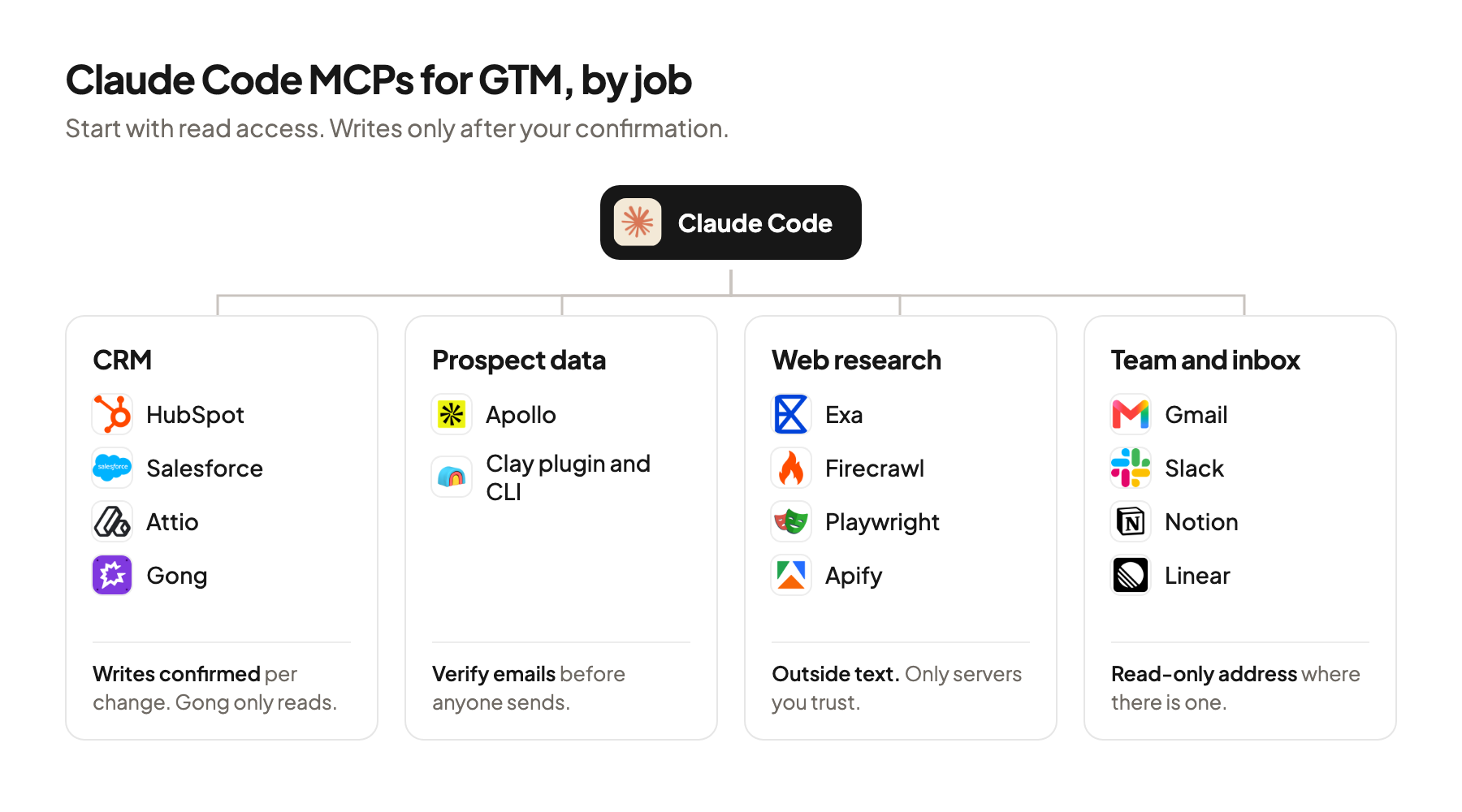
Team and inbox servers: Gmail, Slack, Notion and Linear
These servers connect Claude Code to where your team talks and writes things down. They are useful for reports and summaries, and the ones that can send need the most care.
Gmail comes in two versions. Anthropic’s Gmail connector searches and reads emails, writes drafts, and can send, reply and forward with a confirmation for each action (Google Workspace connectors, 2026). In Claude Code you get it by connecting it in claude.ai first. Google also runs its own Gmail server as a developer preview. It searches threads and creates drafts, has no send tool, and needs a Google Cloud project.
Slack can read and send. Its official server searches messages, files, users and channels and can send messages to any conversation. Only apps published in Slack’s directory or internal apps may use it, and Claude Code is listed as a partner client. A weekly pipeline summary posted to a team channel is a typical use.
Notion and Linear hold your notes and tasks. Notion’s remote server reads, updates and creates pages and databases. Linear offers two addresses: one that reads and writes, and one that only reads.
claude mcp add --transport http notion https://mcp.notion.com/mcp
claude mcp add --transport http linear-server https://mcp.linear.app/mcp/readonly
Use the read-only version when there is one. You can switch to the full address later, once you know which writes you actually want.
Set limits before you connect more servers
Each server adds tools Claude can call, so decide what it may do before the second or third one goes in. Three settings carry most of the safety.
Approve writes, at least at first. In Claude Code’s default permission mode, Claude asks before it uses a tool, and HubSpot, Attio and Anthropic’s Gmail connector add their own confirmation on top. Keep it that way until you have seen a few weeks of proposed changes.
Block what must never happen. Instructions in CLAUDE.md, the file Claude reads at the start of every session, are treated “as context, not enforced configuration” (Claude Code memory docs, 2026). A deny rule in the settings file or a hook (a small command that runs before every tool call) blocks a tool every time. The setup with a deny rule is in How to Run Your GTM Out of Claude Code.
Keep big exports out of the conversation. Claude Code warns when one server answer passes 10,000 tokens and cuts it off at 25,000 tokens by default. A token is a small piece of text, roughly part of a word. A full contact or deal export goes into a file through the vendor’s API, and Claude reads the file.
Check the plan your data runs on. CRM records and emails pass through Claude when a server returns them. Under commercial terms (Team, Enterprise and the API), Anthropic doesn’t train models on that data unless you opt in. On Free, Pro and Max accounts, a privacy setting decides it (Claude Code data usage, 2026).
Where this usually goes wrong
- Connecting every server on day one. Add one per job, use it for a week, then add the next.
- Starting with write access. Pick the read-only address or keep the confirmation step until you trust the proposed changes.
- Trusting a server because it is listed somewhere. Prefer servers run by the vendor and check who publishes a local package before you run it.
- Pulling full exports through a server. Answers are cut off at 25,000 tokens, so large data goes into a file through the API.
- Writing “never send” into CLAUDE.md and stopping there. Only a deny rule or a hook blocks a tool.
Where to start
Add the server for the tool you open most often, in read mode, with local scope. For most teams that’s the CRM. Use it for a week of call prep and pipeline questions before you add a data or web server.
The best Claude Code MCPs are the few that match the jobs you repeat every week, with writes that you still approve. If you’d like help choosing and connecting them in your own tools, book a 30-minute system check.
Pick your next step
Build it yourself
If you have the time to build and maintain it. The guide walks through every step.
Get the free target market map
If you haven't run outbound yet. Your market, its buying signals and who to contact first.
Book a system check
If you want it built in your own tools. 30 minutes on your market, outbound and sales capacity.
FAQ
What is the difference between an MCP server and a plugin in Claude Code?
An MCP server gives Claude tools from another product. A plugin is a package that can bundle skills, commands and MCP server settings in one install. Clay and Exa ship plugins, and Anthropic’s sales plugin preconfigures many GTM servers at once.
Are Claude Code MCP servers free?
Adding a server costs nothing in Claude Code. What you pay depends on the vendor: Apollo says any plan works, including free, and Exa and Firecrawl let you start without a key within limits. Tools that bill by usage, like Apify, count server use toward your plan.
Should I use the remote or the local version of a server?
Use the remote version when the vendor offers one. Anthropic recommends remote HTTP servers, and you log in with your normal account. Local servers make sense for tools that need your own browser or files, like Playwright.
How do I share the same MCP servers with my team?
Add them with project scope. Claude Code then writes them to a .mcp.json file in the project folder, and everyone who shares the folder through git gets the same servers. Each person still logs in with their own account.
Can an MCP server send emails or messages on its own?
Some can. Slack’s server sends messages, and Anthropic’s Gmail connector can send after a confirmation. I’d keep anything that reaches a prospect manual, and use the read-only version of a server wherever one exists.
Which MCP server should a founder add first?
The CRM, in read mode. If there is no CRM yet, start with a web research server like Exa for account research, and add Apollo or Clay when you build the first list.
Sources (18)
- Connect Claude Code to tools via MCP, Anthropic
- HubSpot MCP server, HubSpot
- Attio MCP overview, Attio
- Salesforce hosted MCP servers, Salesforce on GitHub
- Gong MCP server, Gong
- Apollo MCP, Apollo.io
- Clay agent plugin quickstart, Clay
- Exa MCP, Exa
- Firecrawl MCP server, Firecrawl
- Playwright MCP, Microsoft on GitHub
- Apify MCP server, Apify
- Use Google Workspace connectors, Anthropic
- Gmail MCP server, Google
- Slack MCP server, Slack
- Notion MCP, Notion
- Linear MCP, Linear
- How Claude remembers your project, Anthropic
- Data usage, Anthropic