This is a full course on building a TAM (total addressable market) from scratch.
We’ll go through one real project step by step: a list of every company in the US that repairs commercial kitchen equipment.
The example is real. In September we built this list for a software company that sells to repair shops. These shops fix ovens, fryers, walk-in coolers and ice machines in restaurants, hotels and schools. Every number below comes from that build.
We checked 25,763 companies and kept 14,710. In the final quality check, 99% of the companies confirmed on their website were correct. The tools cost $230, plus the people-data subscription we already pay for.
This guide is for founders, GTM (go-to-market) engineers and anyone who builds lead lists. If you already have an unchecked list of companies, write the note from step 1 and skip to step 5.
How a TAM build works
Most lists start from a database filter, for example “industry: restaurant equipment repair, country: US”. Filters fail in two ways. They miss real customers, because many companies pick the wrong industry label or none at all. And they let in companies that only look right, like restaurants in a refrigeration search.
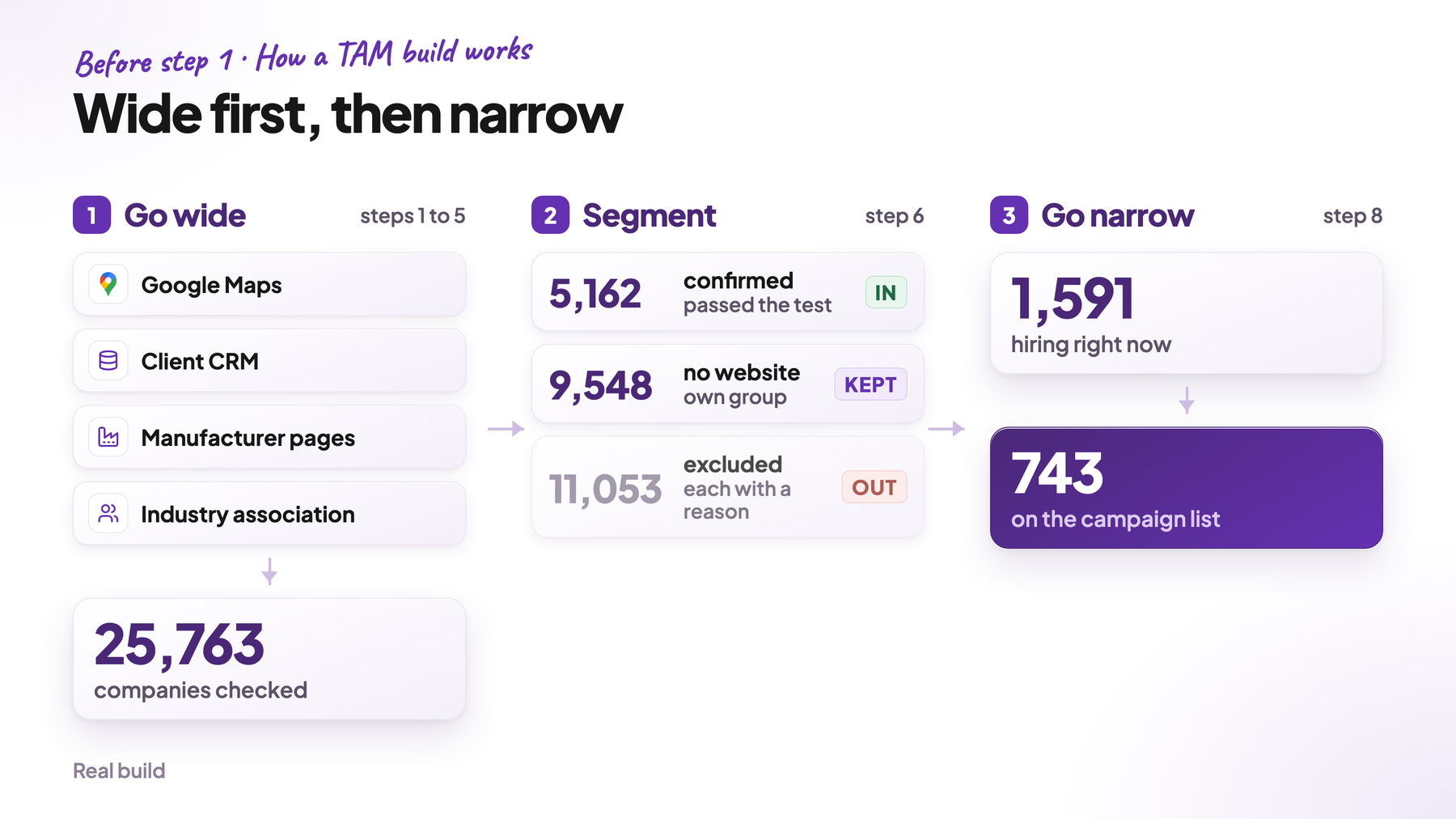
So we build in the other direction: wide first, then narrow.
- Go wide. Collect every company that could fit, from every source that is relevant. Only filter by location and size. Too many companies at this point is fine.
- Segment. Check every company against one clear question and put it into a group: confirmed, without a website, or excluded, always with a reason.
- Go narrow. Inside the groups you keep, find the companies with a signal, a sign they may need you right now, and the people you can reach there. That’s your campaign list.
Checking thousands of companies with AI costs only a few dollars today, so an extended search is cheap. Missing the right ones is what costs you.
Steps 1 to 5 go wide and step 6 segments. Step 7 repeats both until nothing new turns up, and step 8 goes narrow. Steps 9 to 11 check the list, keep it current and show the cost.
1. Start with your best customers
Pick 10 to 20 customers of the kind you want more of. They show you what the rest of your market looks like. If you don’t have customers yet, use your best open deals or the companies you most want to win.
Then write a short note with three parts. Here’s ours:
WHO WE'RE LOOKING FOR

1. Examples: our best customers
   16 companies from the client's CRM

2. The test for every new company the search finds
   Does this business service commercial kitchen or commercial
   refrigeration equipment for restaurants, hotels and other
   foodservice operators?

3. False matches: companies the search will find that don't fit
   - restaurants, hotels and grocers (they own the equipment)
   - shops that only do home appliances or home heating and cooling
   - dealers that sell equipment but don't send technicians
Part 1, your customers, gives you the search terms. The words your customers use for themselves are the words to search for. If their Google Maps listings say “walk-in cooler repair”, that becomes a search term. Step 3 shows how.
Let Claude Code do the work for you. Give it your customers’ websites, your call transcripts and any other internal data that helps, like CRM notes or won deals. In a few minutes you get a precise ideal customer profile (ICP), a description of the companies that fit you best, plus a list of places to search.
Here are our best customers: [websites]
Here is what we know about them: [call transcripts, CRM notes, won deals]

Read all of it and give me:
1. What they do, in their own words, and which products or brands they name
2. Who their customers are
3. The Google Maps categories and search terms that would find them
4. Directories, associations or manufacturer lists they appear in
5. One yes/no test question that every one of them passes

Write "not found" wherever the material doesn't say.
Part 2, the test question, decides which companies make the list. An AI model reads each website and answers it with yes or no (step 6).
Part 3, the false matches, prevents the most common mistakes. A search for “refrigeration repair” also brings up restaurants, because their listings mention walk-in coolers. But restaurants don’t repair anything. They’re the customers of the shops you’re looking for. Name them in part 3, and the model says no.
Expect the note to change. During testing we added five exclusions, such as industrial refrigeration firms, because the model kept accepting them.
2. Know what’s inside your TAM
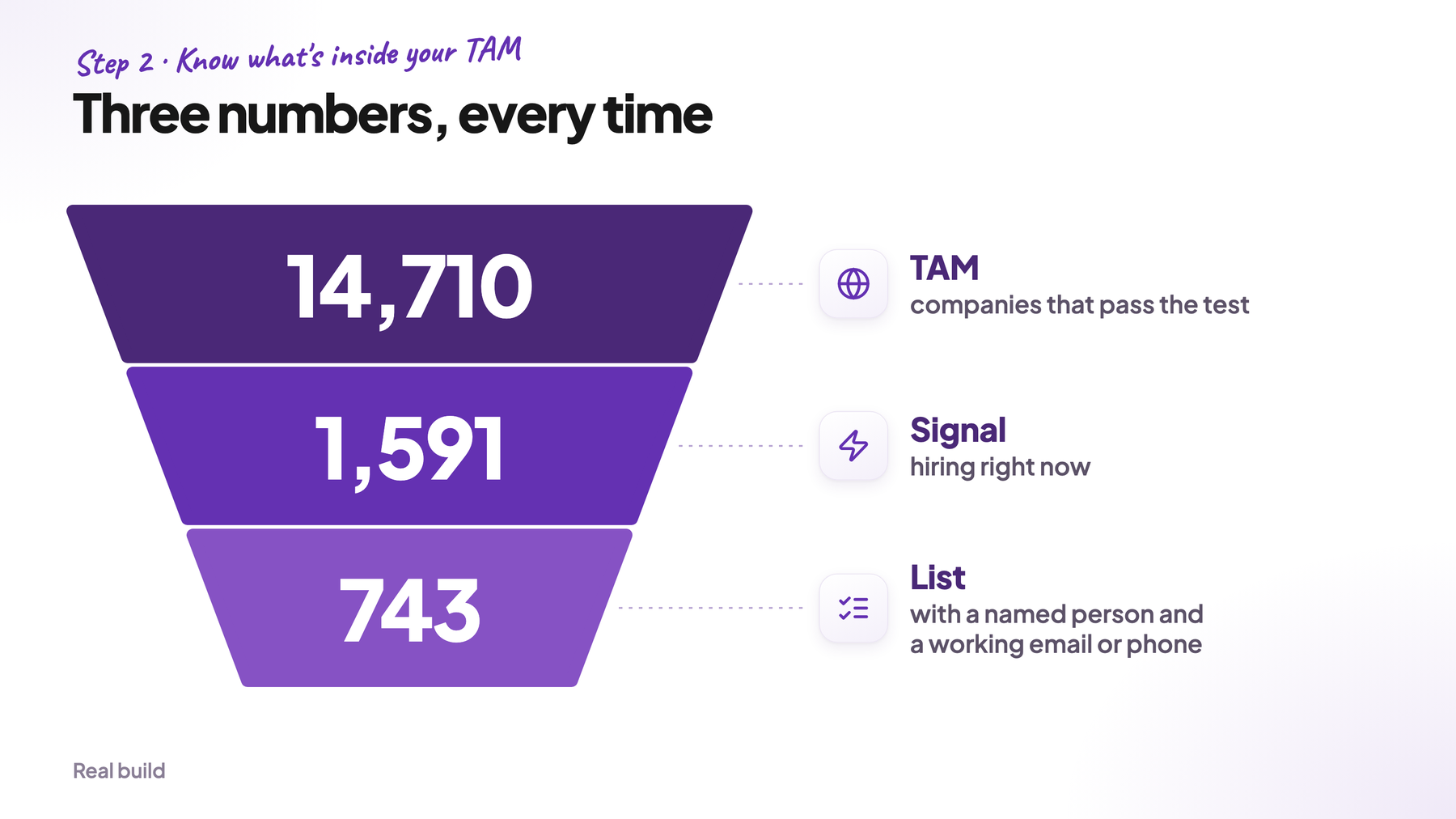
A TAM build gives you three numbers:
- TAM: every company that passes your test, whether you can reach it or not. Ours: 14,710.
- Signal: the companies inside your TAM that show a sign they may need you right now (a buying signal). For us, that was 1,591 shops that were hiring. A shop that hires is growing, and growing shops are more open to new tools.
- Campaign list: the signal companies where you also have a named person and a working email or phone number. Ours: 743 shops.
Steps 3 to 7 build the TAM. The signal and the campaign list come in steps 6 and 8.
Always report all three together. If you only show the campaign list, the market looks tiny. If you only show the TAM, nobody understands why the first campaign goes to just 743 shops.
3. Find out how databases describe your customers
Before you search, check how Google Maps or LinkedIn labels your customers. The labels are often different from what you’d expect.
Look up each customer and write down its labels. On LinkedIn, that’s the industry and the keywords. On Google Maps, it’s the category and the words in the business description.
We worked out our nine search terms together with the client, from how their best customers describe their own work. The labels make a huge difference. In our search, “restaurant equipment repair” found only 436 businesses, while “walk-in cooler repair” found 7,498. That’s why every label goes into the search.
Rule: search every label that at least one customer has. At this stage, only filter by location and company size. Any other filter is a guess, and a wrong guess removes companies without you ever noticing.
4. Collect every company that could fit
Now collect every company that matches your labels, even if many won’t fit. Step 6 removes the wrong ones. Where you look depends on your market.
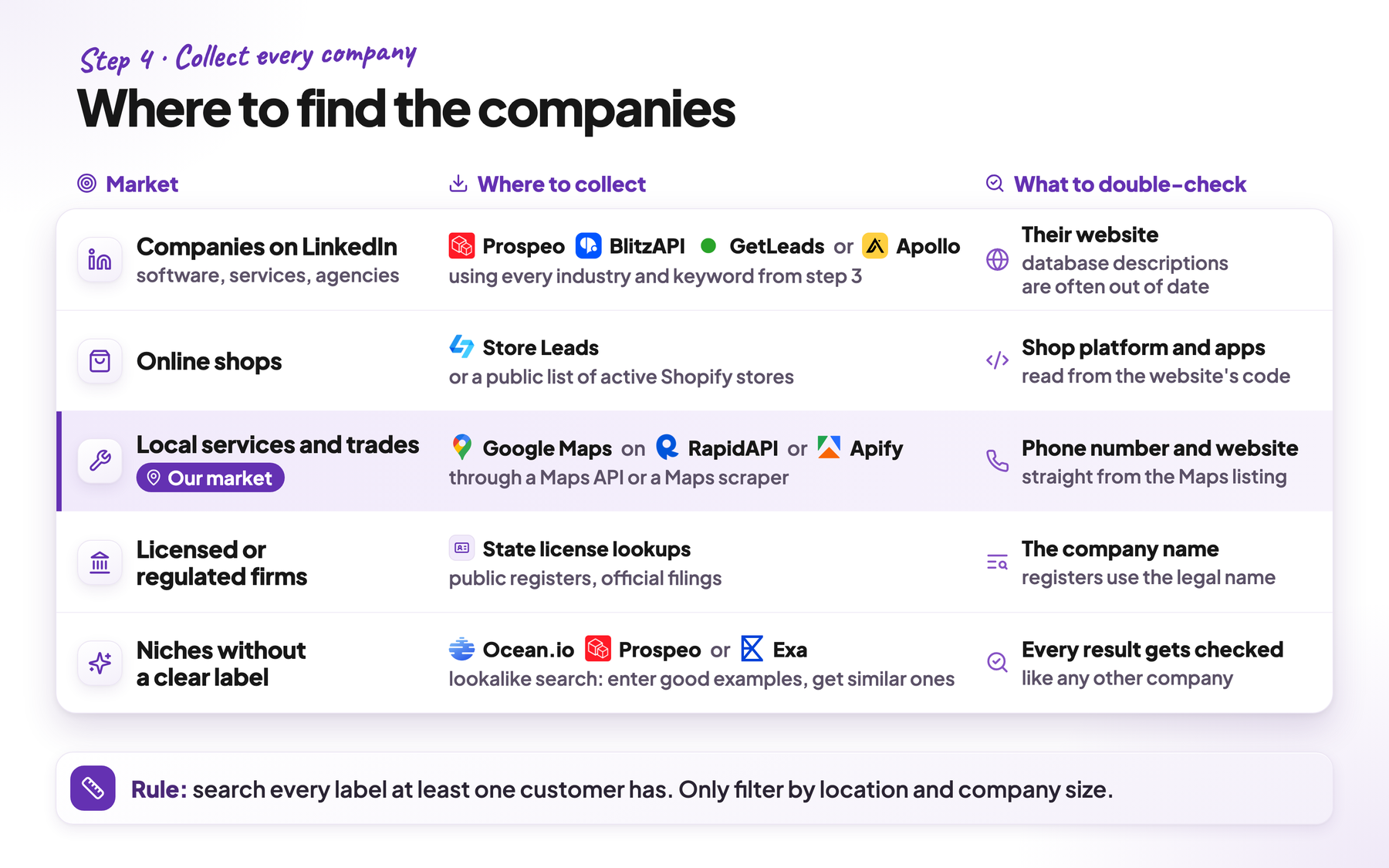
Prospeo, BlitzAPI, GetLeads and Apollo are databases of companies and people. RapidAPI and Apify are marketplaces for small tools that pull data from sites like Google Maps into a spreadsheet. Store Leads is a database of online shops.
| Market | Where to collect | What to double-check |
|---|---|---|
| Companies on LinkedIn (software, services, agencies) | Prospeo, BlitzAPI, GetLeads or Apollo, using every industry and keyword from step 3 | Their website, because database descriptions are often out of date |
| Online shops | Store Leads or a public list of active Shopify stores | Their shop platform and apps, read from the website’s code |
| Local services and trades | Google Maps, through a Maps API on RapidAPI or a Maps scraper on Apify | Whether the phone number and website on the listing still work |
| Licensed or regulated firms | State license lookups, public registers, official filings | The company name, because registers use the legal name |
| Niches without a clear label | Lookalike search in Ocean.io, Prospeo or Exa: you enter good example companies and get similar ones back | Every result gets checked like any other company |
Most of our market is on Google Maps, so here’s how to search it completely. Maps only shows businesses near the place you search. To find the small-town shops too, search ZIP code by ZIP code: one search for each ZIP code and search term. The US has 38,608 ZIP codes with residents.
The Maps Data API on RapidAPI has a free plan with 1,000 searches a month, and paid plans for $5 (30,000 searches) or $25 (300,000) a month. Each search returns up to 200 businesses. Nine search terms across every ZIP code make 347,472 searches, two months of the $25 plan.
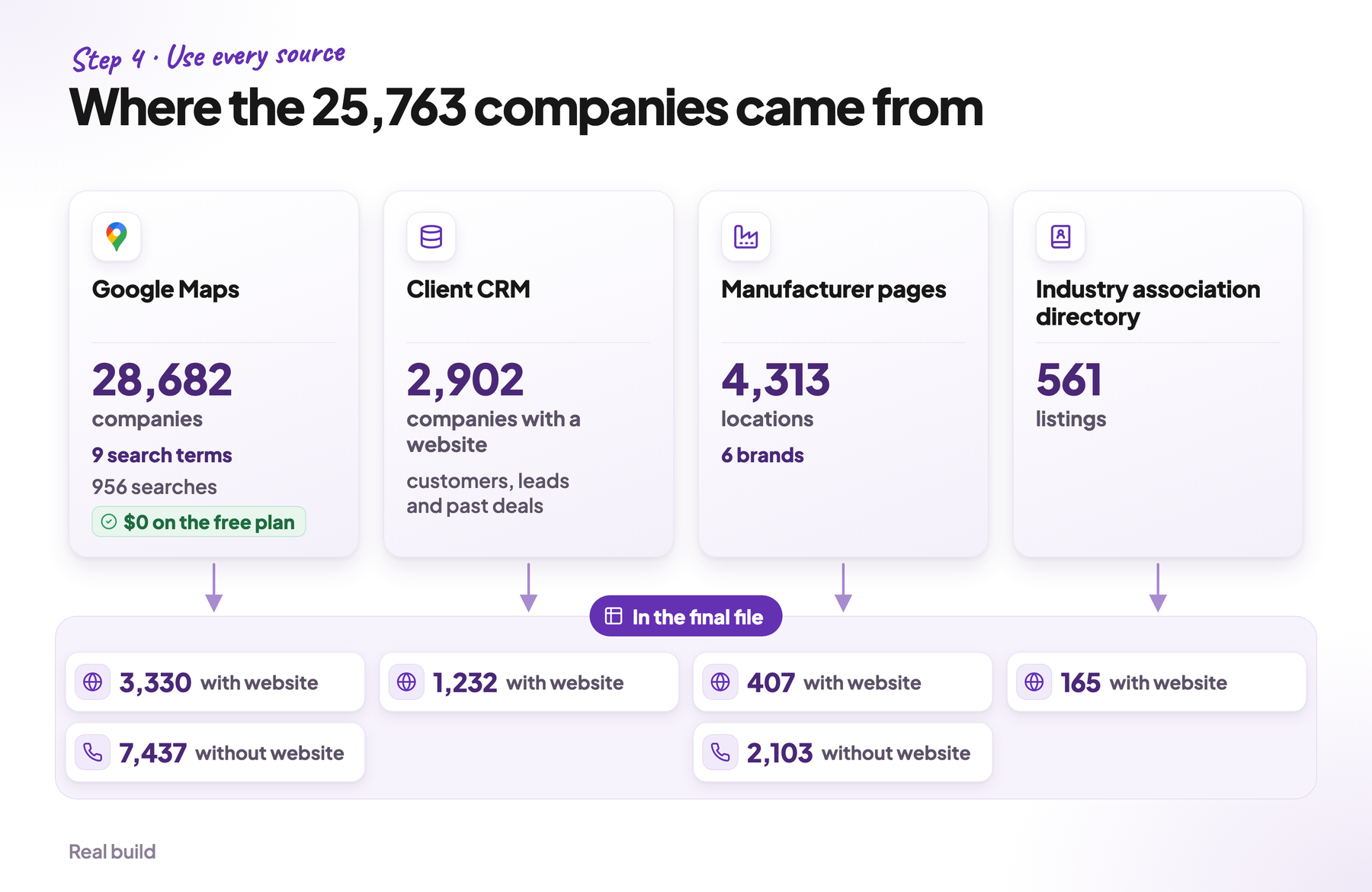
Then add every other source. We used three more: the client’s CRM, the “find a service partner” pages of equipment manufacturers, and the member directory of the industry association. The manufacturer pages added 2,510 shops that Maps had missed, 2,103 of them without a website.
5. Remove duplicates before you pay for anything
Different search terms and neighboring areas find the same companies again and again. Our Maps searches returned 69,691 results. That was 36,883 different businesses, and 28,682 companies after we merged locations that share a website.
Remove duplicates before every step that costs money. For Maps results, compare the place ID, Google’s unique ID for each business. Email tools charge per company or website, so remove duplicate websites first.
Three rules help the most:
- Reduce every URL to the plain domain. “https://www.example-repair.com/services” and “example-repair.com” are the same company.
- Make one exception for social media links. Many small businesses list their Facebook page as their website. Reduced to “facebook.com”, 200 different companies merge into one. Keep the full link for them.
- Skip free email domains. Many CRM records have an email address but no website, so you take the domain from the email: info@example-repair.com becomes example-repair.com. For free addresses this fails. Hundreds of shops use gmail.com and would all merge into one company. So skip domains like gmail.com or comcast.net.
6. Check every company with AI
This is the most important step. The databases find candidates, and an AI model decides who really belongs on the list.
Start with the cheap filters. The Maps category and the business name remove obvious mismatches like restaurants. This doesn’t break the rule from step 3, because you’ve already collected everything and can look at each category before you remove it. If you filter by keywords, match whole words only. “Combi”, a commercial oven, matches “combining”, and “Garland”, a stove brand, turned out to be the city in Texas every time.
These filters removed 8,956 of our 28,682 Maps companies. With the other three sources, that left 25,763 companies to check.
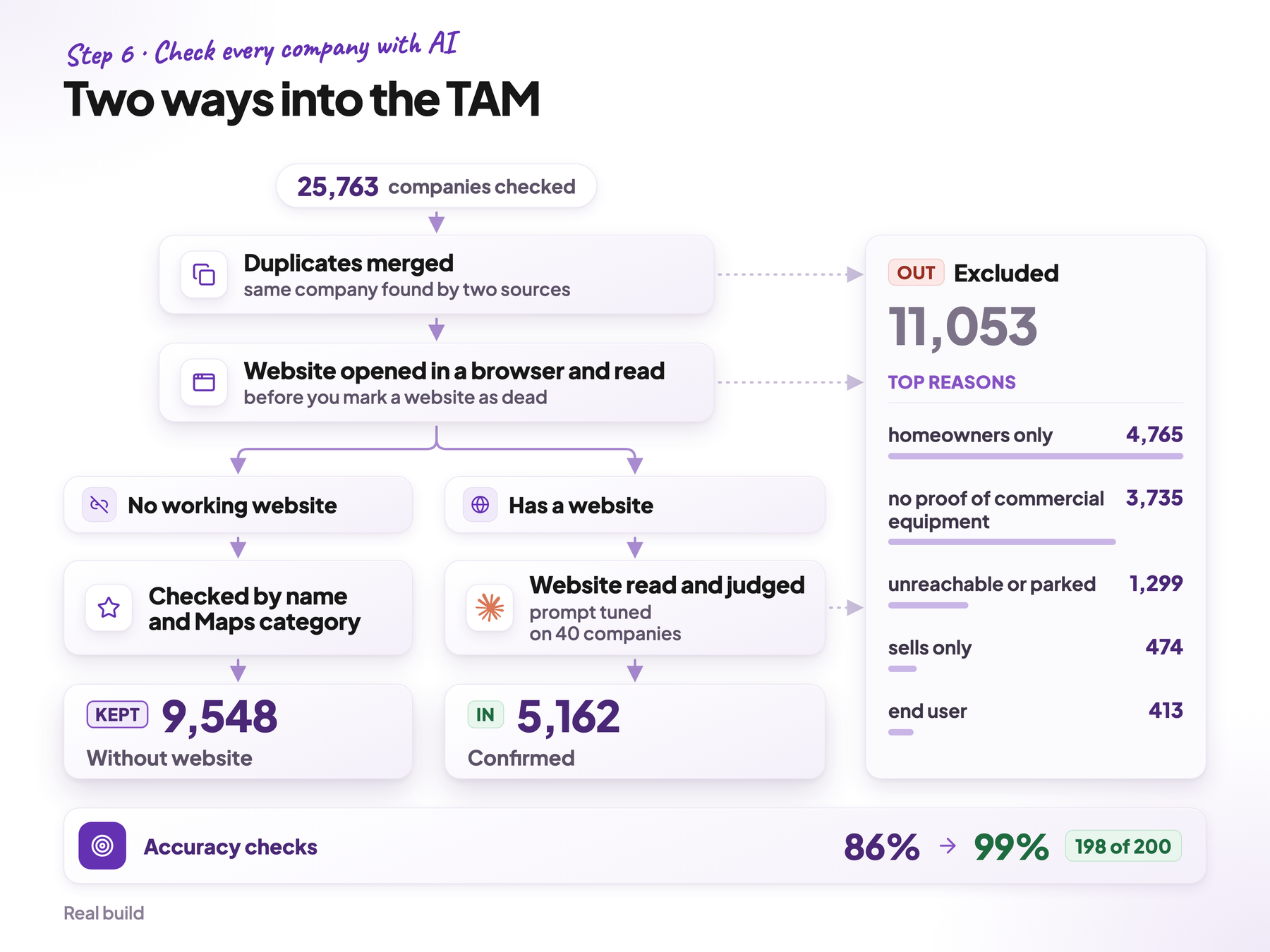
Then let AI check the website of every remaining company. A script opens each website, puts its text into the prompt below and saves the answer. Check all of them, because a sample leaves the mistakes in the rest on your list. In our build, Claude Code read every website where the category and the business name didn’t already decide it.
You don’t need to pay per website. We use Claude Code together with Gemma, a free AI model from Google that runs locally on your computer. Gemma is slower, but free. Claude Code reads the websites, Gemma reads them a second time, and a company only goes out when both say no.
Some websites block automated visits and only look dead to a script. Open them in a real browser before you remove them.
We used Playwright, a free tool that lets a script open pages in a real browser. Claude Code writes the script for you. In our project, 1,251 of the 2,902 CRM websites only looked dead.
Here’s the prompt I’d use:
You are checking one business for a market list.

Question: [part 2 of the note from step 1]
Answer NO if: [part 3 of the note from step 1]

Input:
- name: {name}
- category: {category}
- website_text: {homepage + services page, first 4,000 characters}

Return JSON:
- answer: "yes" | "no" | "unclear"
- evidence: the exact phrase from website_text behind the answer
- confidence: a number from 0 to 1 for how sure you are
- no_reason: the first item from the "Answer NO if" list that applies, or "none"

Rules:
1. Use only the input. If the text doesn't say it, answer "unclear".
2. Never decide from the name alone.
3. Quote evidence word for word.
An “unclear” answer means the website gives no proof. Those companies go on the excluded list with the reason “no proof”.
Improve the prompt until the model agrees with you on two rounds of 10 in a row. We checked 40 companies by hand and compared our answers with the model’s. After every fix to the prompt, we needed two perfect rounds again.
Measure the accuracy on a random sample. Our first sample of 200 was 86% correct. Then we tuned the prompt on 40 companies, had the model reread the 411 websites with the weakest proof, and tightened what counts as proof of commercial equipment. In the final test, 198 of 200 were correct. That’s 99%.
Don’t throw away the businesses without a website. In local trades, many good shops never built one. Check them by name and Maps category and keep them as a separate group.
In our project that was 9,548 shops, 65% of the TAM. We kept all of them, because cold calling is normal in this industry and every one of these shops had a phone number. 2,125 of them were authorized by a manufacturer. For a team that calls, this is the best part of the list.
The result: 5,162 companies confirmed on their website, 9,548 without a website, and 11,053 excluded. The two biggest reasons for excluding were homeowner-only work (4,765) and no proof of commercial equipment (3,735).
Read your signal from the same text. Our signal was hiring. A “Join our team” or careers page was enough, and 1,591 of the 5,162 confirmed shops had one.
7. Search again until nothing new turns up
One search never finds everything. So use the companies that passed your check as new examples.
Run a lookalike search. Tools like Prospeo, Ocean.io or Exa find companies that are similar to the ones you give them. Remove every company you’ve already checked and run the new ones through the same prompt from step 6.
Repeat until a round brings almost nothing new. A good rule is less than 3% new companies per round. Set a budget limit too, so the search doesn’t run forever.
Compare with an official register if one exists. In the US, banks, investment advisers and school districts all have one. Every company in the register that’s missing from your list is one your search missed. Our market had no register, so the industry association’s member directory was the closest thing.
8. Find the people and their emails
Only now do you look for contacts, and only at companies that made the list.
Before you pay for contacts, estimate how many you’ll reach. Run your contact tools on a small test batch and count how often they find a named person and a valid email. That tells you what the full run will bring and cost. It also shows the client what the campaign can do before anything is executed.
People. Add the job titles that buy from you to your note. For our client, that was the owner or a manager. For companies on LinkedIn, find every person with those titles. Start with GetLeads and BlitzAPI. Both are flat rate: one payment a month for unlimited access to their database. Use Prospeo last, because you pay per contact there.
Local service businesses are different. More than half of our shops had no LinkedIn company page, so LinkedIn-based tools found few owners. BlitzAPI added 455 contacts. These sources worked better, from best to weakest:
- a web search for “who owns [company] in [city]”, run by a script through a search API. An AI model reads the results and writes down the owner’s name. This found the owner for 57% of the shops we tried.
- Exa, an AI search engine, which found a name for 31% of the shops it searched
- state business registers, which list who runs each company, where the state publishes them
- the company’s own website, which named the owner in only 3% of cases
Only keep names with a source. Every name needs a link to the page it came from, like a register entry or the company’s own website. If there’s no link behind a name, it doesn’t go on the list.
In the end we had 4,347 named people, four out of five of them owners or managers. For 68% of the shops with a website, we had the owner’s name.
Emails. Most small businesses use one of a few address formats. In our build, three formats covered 96% of the addresses we confirmed: first.last@company.com, first@company.com and the first letter plus the last name, like jsmith@company.com.
So for every named person, build these three addresses and check them in that order with an email verifier. A verifier asks the company’s mail server whether the mailbox exists, without sending an email. Keep the first address that comes back valid. We used MillionVerifier, and this found a valid email for 41% of the names.
This is the cheapest way to find emails, because you only pay for the checks, and a check costs a fraction of a cent. Pay an email finder like Prospeo or LeadMagic only for the names the formats don’t solve. Verify those addresses too, and only send to valid ones.
Some mail servers accept mail for any address, so a normal check can’t confirm them. These are catch-all addresses. Check them with a tool built for this, like LeadMagic or BounceBan. Drop every address that comes back “unknown”, because the verifier couldn’t confirm it.
Verify the emails in your CRM too. Addresses go stale even in a well-kept CRM, and 23% of the ones we checked no longer worked.
For small businesses, the phone matters too. In this industry, a call often works better than an email. We had a verified email for 1,269 contacts and a catch-all address for 951. For most others we had a name and the shop’s phone number, and for some owners a mobile number.
Sort by fit and timing before you reach out. Give every company two scores. Fit is how closely it matches your best customers, for example its size or proof of the work you serve. Timing is how urgent it is right now, for example a new job post. Companies high on both get the most personal outreach: a call, an email and a LinkedIn message from one person. The rest go into automated email and LinkedIn sequences.
9. Read the list by hand before you hand it over
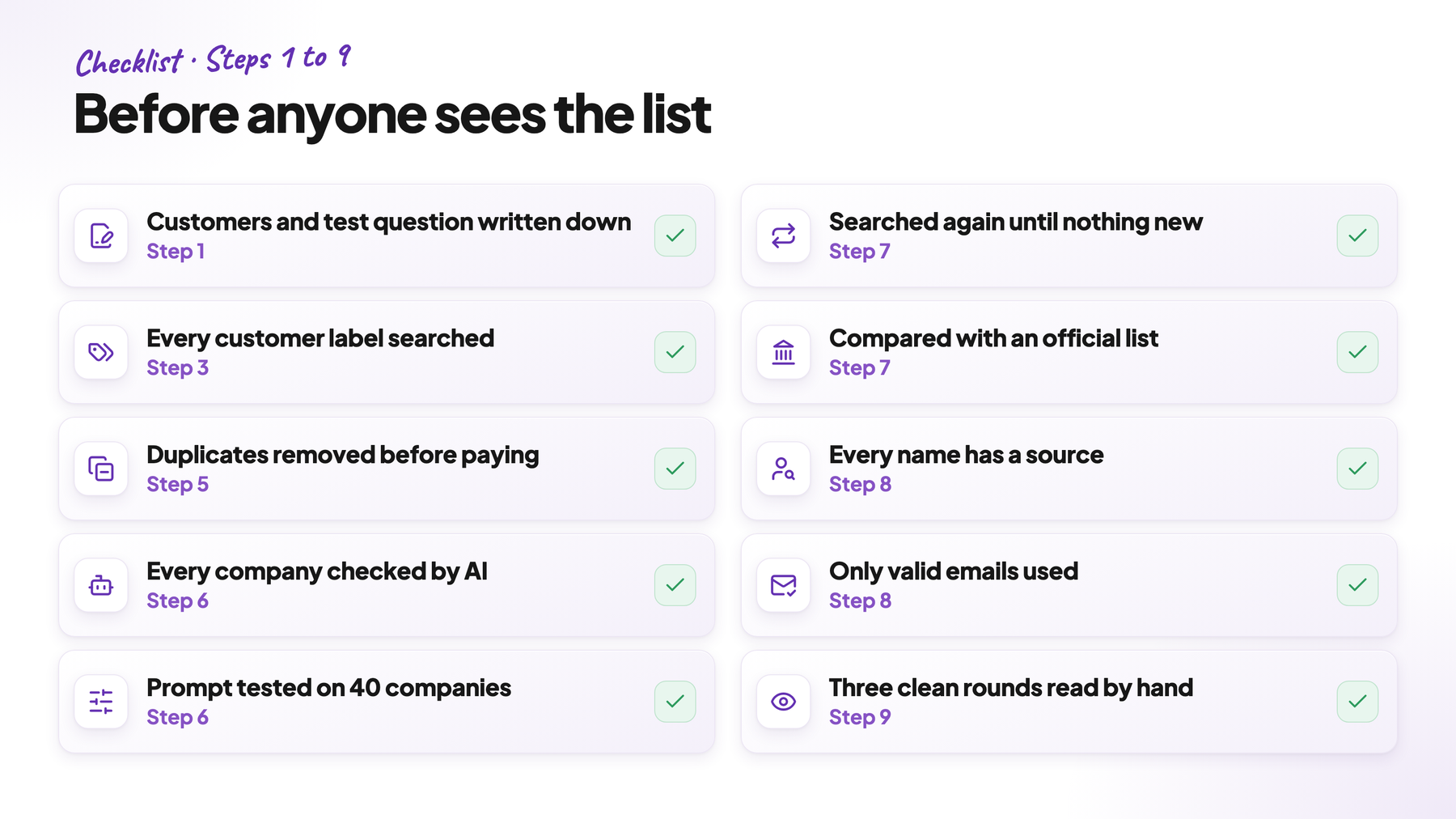
Rules only catch the problems you already know about. So before the list goes anywhere, read it yourself.
Pick ten rows: three random confirmed rows, the two the model was most sure about, the two it was least sure about, two without a website and one excluded.
Open each website and ask yourself: does this company belong in the market, and would you send this email? If a row is wrong, fix the rule that let it through and pick ten new rows. The list is ready when three rounds of ten in a row come back clean.
Before anyone sends an email, mark existing customers and open deals. In our file, every company the client was already selling to, talking to or had lost a deal with was marked “do not contact”.
10. Keep the list up to date
A TAM shows the market on one day. Keep the whole TAM in one table and take each month’s campaign from it.
Refresh it on a schedule. Check every month which companies show a new signal, update every company’s data once a quarter, and repeat step 7 every few months to find shops that just opened.
11. What it cost
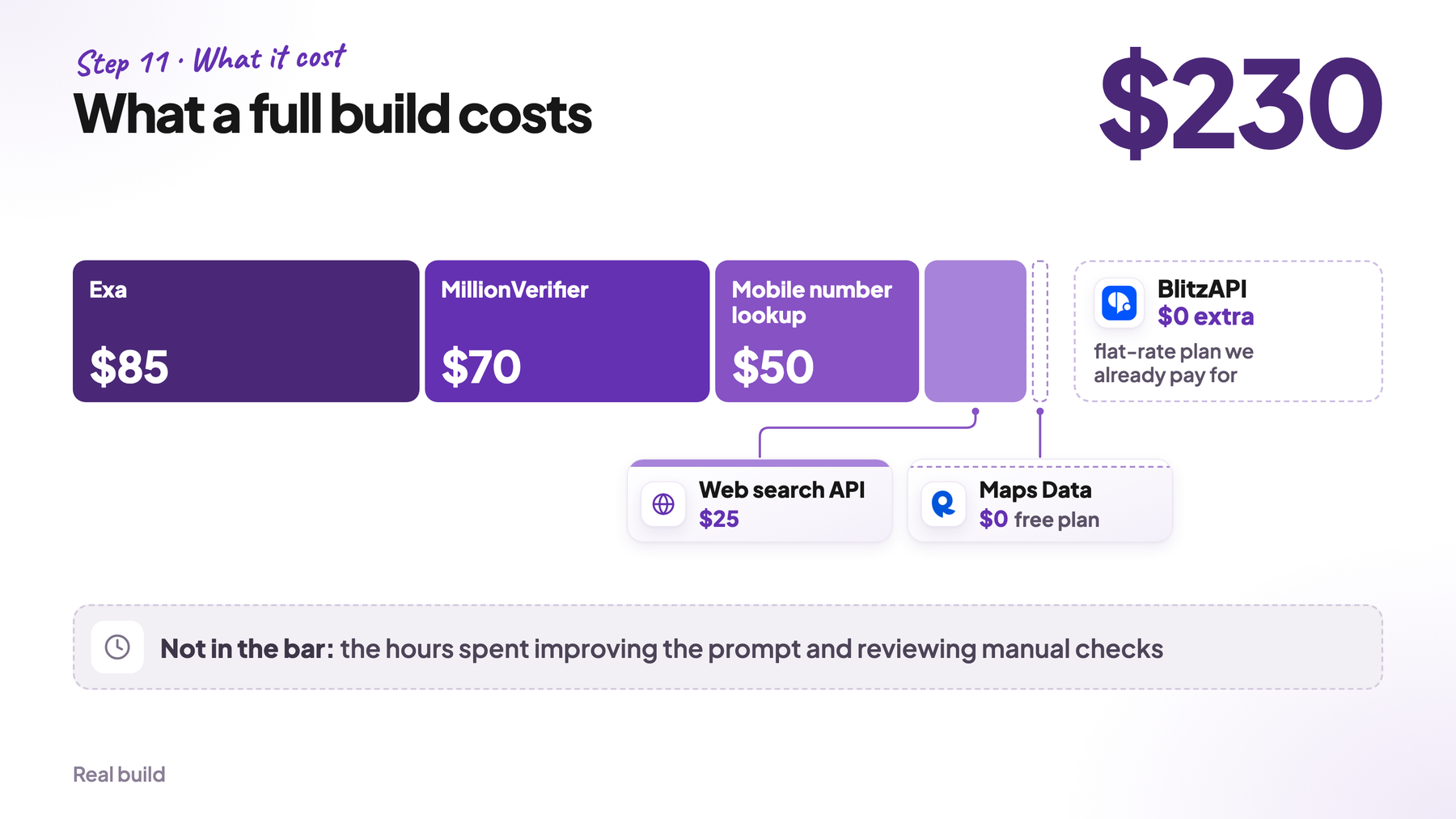
Here’s what we paid for tools. Finding the companies cost nothing. The people data came from our BlitzAPI flat-rate plan, which we pay for anyway, so it isn’t included. If you buy a people-data plan just for this project, add one month of it.
| Tool | What for | Cost |
|---|---|---|
| Maps Data API on RapidAPI | 956 searches | $0 (free plan) |
| Claude Code | Reading the hardest websites, tuning the prompt | $0 extra (subscription we already pay for) |
| BlitzAPI | People and company data | $0 extra (flat-rate plan we already pay for) |
| Exa | Finding owner names | $85 |
| MillionVerifier | Email verification | $70 |
| Mobile number lookup | Owners’ mobile numbers | $50 |
| Web search API | “Who owns” searches | $25 |
| Total | $230 |
Most of the important work went into the prompt and the hand checks. If you need to save time, save it somewhere else.
Where to start today
You can start your TAM today in three steps:
- Write your note. Give Claude Code your 10 best customers with the prompt from step 1. You get the examples, the test question, the false matches and the labels to search for.
- Collect every company that could fit. Search every label on Google Maps or in your database, and remove the duplicates.
- Let AI check and qualify them. Run the prompt from step 6 on every company. The companies that pass are your TAM.

