You have a CRM, a calendar full of calls and an inbox with replies nobody has sorted yet. Most guides on claude code for sales show a demo prompt and stop there. This one goes job by job: what Claude Code does for each sales task, which skill or prompt starts it, and which step stays with you.
Claude Code is Anthropic’s AI agent. It reads and writes files, runs commands and connects to your other tools. It was built for developers, but a sales team can use it the same way: one folder, a few saved instructions and read access to the CRM. You don’t need to be an engineer to follow along.
Key takeaways
- Start with Anthropic’s free sales plugin. It installs 36 ready-made sales skills into Claude Code, from call prep to pipeline review, so you only write the skills that are specific to your business.
- Connect your CRM with read access first. Claude Code should read deals and notes, draft the change, and leave the actual write to you or to a tested script.
- Anything with one right answer, like which deals have gone quiet, belongs in a script. Claude writes the summary and the draft, and a person makes the call.
- Instructions in CLAUDE.md guide Claude but don’t enforce anything. Hard limits such as “never send” need permission settings or a hook.
What Claude Code does for a sales team
Claude Code is an agent that works inside a folder on your computer and can use your sales tools through connectors. Anthropic describes it as a tool that “reads your codebase, edits files, runs commands, and integrates with your development tools” (Claude Code docs, 2026). For sales, the “codebase” is a folder with your ICP (ideal customer profile, the description of who you sell to), your offer, call notes and exports.
It runs in four places. The terminal (the text window where you type commands), an IDE (the editor developers write code in), a desktop app and the browser. The desktop app is the easiest start for someone who has never opened a terminal.
It comes with the paid Claude plans. Pro, Max, Team and Enterprise include Claude Code. The Free plan does not.
It differs from the Claude chat app in one way that matters for sales. The chat app answers questions. Claude Code keeps files, runs small programs and repeats the same job the same way next week. That makes it a good fit for work you do every day or every Monday, and a poor fit for a one-off question.
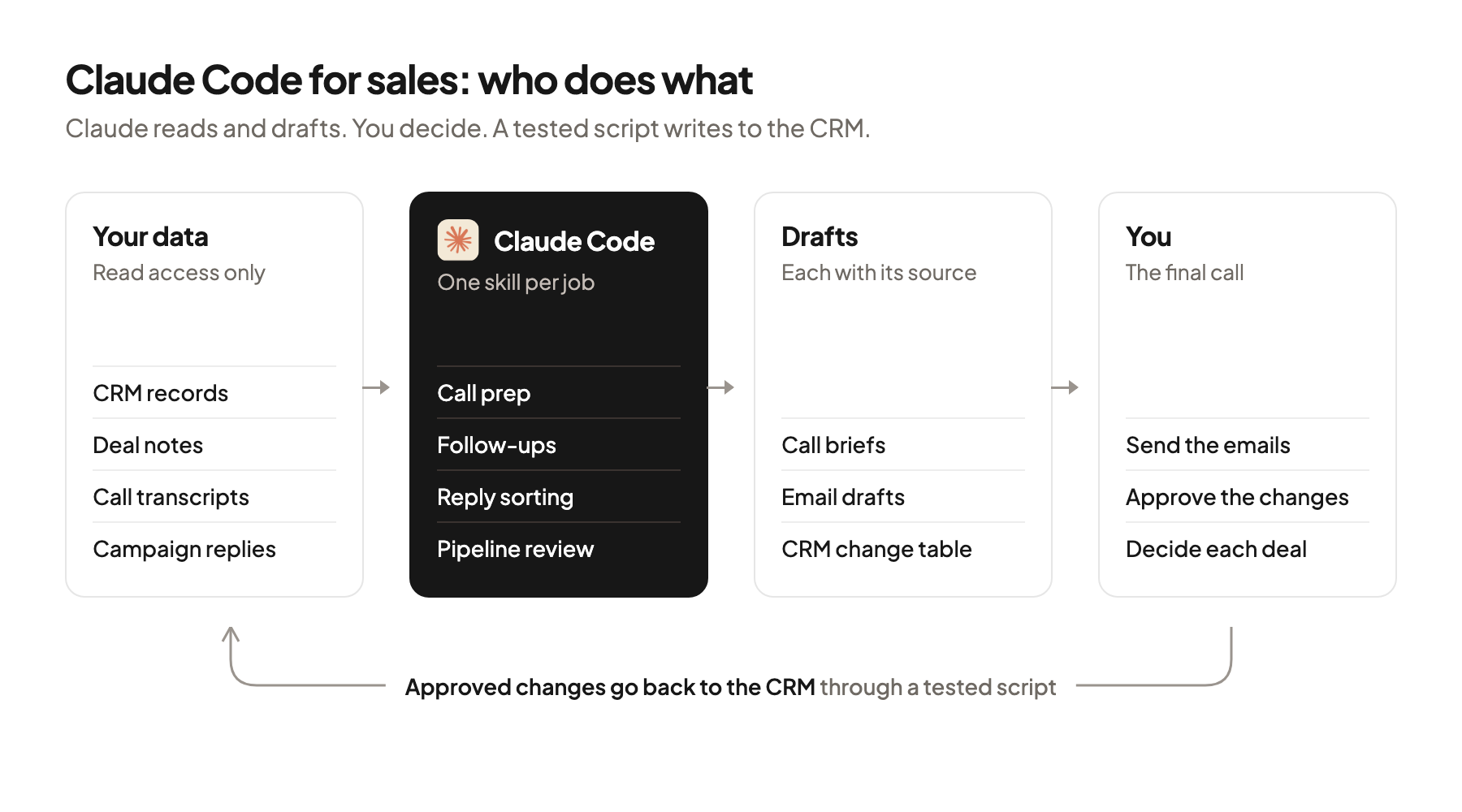
Here is how the work splits for the jobs in this guide:
| Sales job | Claude Code does | You do |
|---|---|---|
| Call prep | Reads the CRM record, past notes and the company website, writes a one-page brief | Read the brief, pick your questions |
| Follow-up after a call | Turns the transcript into a draft email and a list of proposed CRM changes | Edit and send the email, approve the CRM changes |
| Reply sorting | Labels each reply and drafts an answer | Send the answers, handle the calls |
| Weekly pipeline review | Runs a script that finds stalled deals, writes the summary | Decide what happens to each deal |
Install Anthropic’s sales plugin, then write your own skills
The fastest start is Anthropic’s open-source sales plugin, which adds ready-made sales skills to Claude Code. A skill is a saved set of instructions in a file called SKILL.md. Claude uses a skill when your request matches its description, or you call it by name with a slash, like /call-prep.
Anthropic publishes the plugin on GitHub in its knowledge-work-plugins repository. The sales plugin holds 36 skills. Among them are a daily briefing, call prep, call summary, account research, outreach drafts, lead triage, pipeline review and a read-only CRM hygiene check. You install it with two commands in the terminal:
claude plugin marketplace add anthropics/knowledge-work-plugins
claude plugin install sales@knowledge-work-plugins
After that, /sales:call-prep and the other skills are available in every session (one conversation with Claude Code).
The plugin assumes you already have deals. It was built for account executives with a full CRM. If you’re a founder before your first campaign, the work that comes first is missing from it: building the list of companies, finding and checking emails, and setting up the domains you send from. For that part I’d follow my TAM guide and then check the list before you send.
Write your own skill when a plugin skill gets close but keeps missing your rules. A project skill lives in .claude/skills/<name>/SKILL.md inside your folder. Commit the folder to git (a tool that keeps a shared history of files) and your whole team gets the same skill. The short header at the top holds a name and a description, and Claude reads only that header until the skill is used.
Build a skill the third time you type the same instructions. Before that, the instructions still change too often to save. The full setup, with the folder structure and the CLAUDE.md file every session reads first, is in How to Run Your GTM Out of Claude Code. This guide only adds the sales jobs on top.
Connect your CRM with read access first
Connect the CRM through an MCP server and let Claude Code read before you let it write anything. MCP (Model Context Protocol) is an open standard that lets an AI agent call another tool directly in the conversation.
HubSpot is the example in Anthropic’s own docs. One command in the terminal adds HubSpot’s remote server, one that runs on HubSpot’s side:
claude mcp add --transport http hubspot --scope user https://mcp.hubspot.com/anthropicThe scope decides who gets the connection. User scope adds it to all your projects on this computer. Project scope writes it to a file called .mcp.json in the folder, so everyone who shares the folder gets it. Local scope is the default and keeps it in this one project, only for you.
HubSpot’s server can write, with a check. It reads and writes contacts, companies, deals and activities, and its write tools ask for your confirmation before they change a record. Gong’s server only reads: it answers questions about accounts and deals and doesn’t change data in Gong or the CRM. Salesforce, Attio, Apollo, Slack and Notion also run their own servers. They’re compared job by job in which Claude Code MCPs to connect.
Large exports are a reason to use a script instead. Claude Code warns when one answer from an MCP server passes 10,000 tokens and cuts it off at 25,000 tokens by default. A token is a small piece of text, roughly part of a word. A full deal export goes into a file through the CRM’s API, and Claude reads the file.
Two sentences belong in your CLAUDE.md before the first real session. “Read the CRM, never write to it. Propose changes as a table and wait for my OK.” That covers most of the risk, but as the last section shows, it’s guidance and nothing more.
Prep every call and write the follow-up from the transcript
Call prep and the follow-up are the two jobs where Claude Code saves the most typing, because both start from data you already have. The plugin’s call-prep and call-summary skills cover the basics. Add your own rules in the prompt.
A good call-prep prompt names the sources and the format. Say you sell inventory software to craft breweries, and tomorrow you have a first call with a brewery in Ohio:
/sales:call-prep Tomorrow 10am with the brewery in Columbus.
Read their HubSpot record, every note on the deal and their website.
One page: what they make, how they sell (taproom, distribution, both),
what we already know, three discovery questions that fit our ICP.
Every fact gets the source it came from. Leave out what you can't source.
The last line matters most. It turns a confident-sounding brief into one you can check in a minute, and it stops the brief from filling gaps with guesses.
The follow-up starts from the transcript file. Export the transcript from your call recorder, put it in the folder and ask for two things: a draft email and a list of proposed CRM changes. Keep them apart, because you edit the email and only approve the changes.
Read transcripts/brewery-columbus.txt.
1. Draft the follow-up email: what they said the problem is, in their words,
   the next step we agreed on, nothing we didn't discuss.
2. List CRM changes as a table: field, current value, new value, quote from the call.
Don't change anything in HubSpot.
The quote column is your check. If Claude proposes “deal stage: proposal” and the quote doesn’t back it up, you see it right away. You send the email yourself and apply the changes you agree with.
Sort replies and draft answers, but send them yourself
Reply sorting is a good first own skill: the categories are yours, the job repeats every day, and the drafts save time without any risk as long as a person sends them. Put the categories in the skill so every session uses the same ones.
---
name: reply-triage
description: Sort campaign replies and draft answers. Use when I paste replies
  or say "sort the replies". Never sends anything.
---

1. Read context/offer.md and context/objections.md.
2. Give each reply one label: interested, not now, wrong person,
   objection, unsubscribe, out of office.
3. For interested and objection, draft an answer in my voice, under 80 words.
4. For wrong person, pull the name they point to, if any.
5. For unsubscribe, list the address for removal. No draft.
6. Output one table: sender, label, the sentence that decided the label, draft.
The “sentence that decided the label” column works like the quote column in the follow-up. You read the table, fix the few labels that are wrong and send the drafts from your own inbox. When the same mistake comes up twice, add a line to the skill so it stops.
Unsubscribe requests go to the top of your list every time. Remove those addresses in the sending tool the same day, and don’t let a model decide whether a reply counts as one.
Keep the drafts short and specific. A reply to someone who is interested should answer their question and propose one next step. If you want a better first email to begin with, write the first line before you build the list.
Run the weekly pipeline review with a script
The pipeline review splits into a part with one right answer and a part that needs judgment. A script handles the first, Claude handles the second, and you make the decisions.
Which deals have gone quiet is a counting question. “No activity in two weeks and the close date is this month” has exactly one answer for each deal. Let Claude write a small Python script for it once, test it against deals you know, and run the same script every week. A model that reads every deal and decides which ones look stalled may give a different answer next Monday.
The agent shouldn’t decide things that have a right answer.
 Jan BerningFounder, Pipecadence
Scoring follows the same rule, and the lead scoring guide shows how to write it.
Say your rule flags nine deals this week. Claude then reads the notes and recent emails for those nine only and writes one paragraph each: what happened last, what is blocking the deal, a suggested next step. Asking for less text per deal keeps the review short enough that people read it.
You can run it on a schedule. Claude Code has a non-interactive mode for this: claude -p followed by the prompt runs one job and exits, and a skill can be named inside that prompt. Claude Code also offers scheduled tasks for work that repeats. A typical setup runs the review early on Monday and writes the result to a file or a Slack channel for the team.
| Part of the review | Who does it | Why |
|---|---|---|
| Find stalled deals, deals past their close date, deals with no next step | Script | One right answer, same result every week |
| Summarize what happened on each flagged deal | Claude | Reading notes and emails is judgment |
| Decide to push, close lost or escalate | You | Your call and your forecast |
Set the limits before the team uses it
Write down what Claude may do before a second person uses the folder, because the instructions in CLAUDE.md don’t block anything on their own. Anthropic’s docs say Claude treats these files “as context, not enforced configuration” (Claude Code memory docs, 2026).
Use the tools that enforce. Permission modes decide what Claude may do without asking. In the default mode it asks before it edits a file or runs a command. Hooks are small commands that run at fixed points, for example before every tool call, and can block an action every time. A deny rule in the settings file can block a CRM write tool by name, as shown in the setup guide.
Check which plan your data runs on. Under commercial terms (Team, Enterprise and the API), Anthropic doesn’t train models on what you send to Claude Code unless you opt in. On Free, Pro and Max accounts, a setting decides whether your data is used for training, and it applies to Claude Code too (Claude Code data usage, 2026). If CRM data and transcripts go through Claude Code, a Team plan or a checked privacy setting comes first.
Claude Code also keeps a copy of every session on your computer. Transcripts are stored in plain text under ~/.claude/projects/ for 30 days by default. That folder then holds customer names and call notes, so treat the laptop like any other place your CRM data lives.
These steps stay manual, in my view:
- Sending anything that reaches a prospect: emails, replies, connection requests.
- Writing to the CRM, unless a tested script does it after your OK.
- Removing unsubscribed addresses from the sending tool.
- Choosing the offer and the angle. Claude can draft ten, and you pick the one you would defend on a call.
Where this usually goes wrong
- Giving Claude write access to the CRM on day one. Start with read access and approve every change from a table.
- Treating CLAUDE.md as a guardrail. It guides Claude, and only permission settings or a hook block an action.
- Asking the model which deals have stalled. A counting question belongs in a script that gives the same answer every Monday.
- Saving a skill too early. Wait until you have typed the same instructions for the third time.
- Letting a model decide what counts as an unsubscribe. Remove those addresses yourself, the same day.
Where to start
Pick one job from this guide and give it a week. Call prep is the easiest first skill, because the source data is already in your CRM and a bad brief costs you nothing.
Claude Code for sales pays off when each job has a skill, a clear source and a person who makes the final call. If you’d like this set up in your own CRM and inbox, book a 30-minute system check.
Pick your next step
Build it yourself
If you have the time to build and maintain it. The guide walks through every step.
Get the free target market map
If you haven't run outbound yet. Your market, its buying signals and who to contact first.
Book a system check
If you want it built in your own tools. 30 minutes on your market, outbound and sales capacity.
FAQ
Do I need to know how to code to use Claude Code for sales?
No. You describe the job in plain English and Claude writes and runs the small scripts. You need to be comfortable with a folder of text files and a few terminal commands, or you start in the desktop app instead.
Is Claude Code the same as Claude for sales on claude.com?
They are related products. Anthropic’s sales page describes Claude and its sales plugin for reps in the Claude app, and it doesn’t cover Claude Code. Claude Code is the better choice for the person who sets up the workflows and scripts. The same sales plugin works in both.
Which plan do I need?
Claude Code is included in the paid plans: Pro, Max, Team and Enterprise. The Free plan doesn’t include it. For CRM data and call transcripts I’d use a Team plan, because commercial terms exclude your data from model training by default.
Can Claude Code send emails for me?
It can draft them, and with the right connector some tools can send. I’d keep sending manual. A wrong merge field or a wrong reply goes to a real person and can’t be taken back, while drafting is where the time goes anyway.
What is the difference between a skill and a workflow?
A skill is a short saved instruction that Claude loads when your request matches it or when you call it with a slash. A workflow is a longer written process for one job: inputs, steps and what the result looks like. A good skill often just says which context to read and which workflow to follow.
Where should a founder start before the first campaign?
With the list, because every sales job in this guide needs companies and contacts to work on. Build the market list, check it, then add call prep and reply sorting once replies come in. The plugin’s skills are most useful after the first campaign is live.
Sources (7)
- Claude Code overview, Anthropic
- knowledge-work-plugins, sales plugin, Anthropic on GitHub
- Connect Claude Code to tools via MCP, Anthropic
- HubSpot MCP server, HubSpot
- How Claude remembers your project, Anthropic
- Permission modes, Anthropic
- Data usage, Anthropic

