You’ve rewritten your first cold email three times, and it still ends with a request for a call that nobody answers. Someone tells you to offer a lead magnet instead. You search for b2b lead magnets and find lists of ebooks, webinars and checklists that sit behind a form on a website, waiting for visitors who already came looking.
Cold outreach works the other way around. The reader never asked to hear from you, so there is no form and no download page. What works in a first email is a small asset made for the reader’s company, described in one line and offered with a question. This guide covers the kinds of assets you can offer cold, examples by what you sell, how to describe them, and why I build each one only after the reader says yes.
Key takeaways
- A cold lead magnet is a small asset made for one reader’s company or market, offered in the first email with a question the reader can answer in one word.
- Offer the asset first and build it only after the reader says yes. The work then goes only to people who asked for it, and the first email needs no attachment and no link.
- Most cold assets come from public sources: job ads, ad libraries, government award data, a page speed report or the technology a website runs.
- Pick the asset that previews your paid work. A recruiting firm offers a list of companies that are hiring, a paid search agency offers a review of competitor ads.
What a lead magnet is in cold outreach
A lead magnet is something useful you give away so a potential buyer starts a conversation with you. In cold outreach, the reader pays for it with a reply.
The inbound version trades content for contact details. A visitor fills in a form to download a guide. HubSpot describes its forms as a way to “collect information from visitors and create or update records in your CRM.” That model needs a visitor who already found you. A cold reader hasn’t, and you already have their email address.
The cold version trades a specific asset for one word. The reader answers “sure” or “send it,” and the asset arrives. That reply starts a conversation with someone who never asked to hear from you.
A guide that is the same for every reader gives a stranger little reason to answer. An asset about their company, their market or their competitors gives them a reason, because nobody else has made it for them.
| Inbound lead magnet | Cold lead magnet | |
|---|---|---|
| How the reader finds it | On your website, through search, ads or social posts | In your first email or LinkedIn message |
| What the reader gives | Name, email and company in a form | A one-word reply |
| When you build it | Once, before anyone asks | After the reader says yes |
| Who it’s about | Your topic, the same for every reader | The reader’s company, market or competitors |
| Typical format | Ebook, checklist, webinar, template | Short list, review, breakdown, one-page plan |
Offer the asset first and build it after the yes
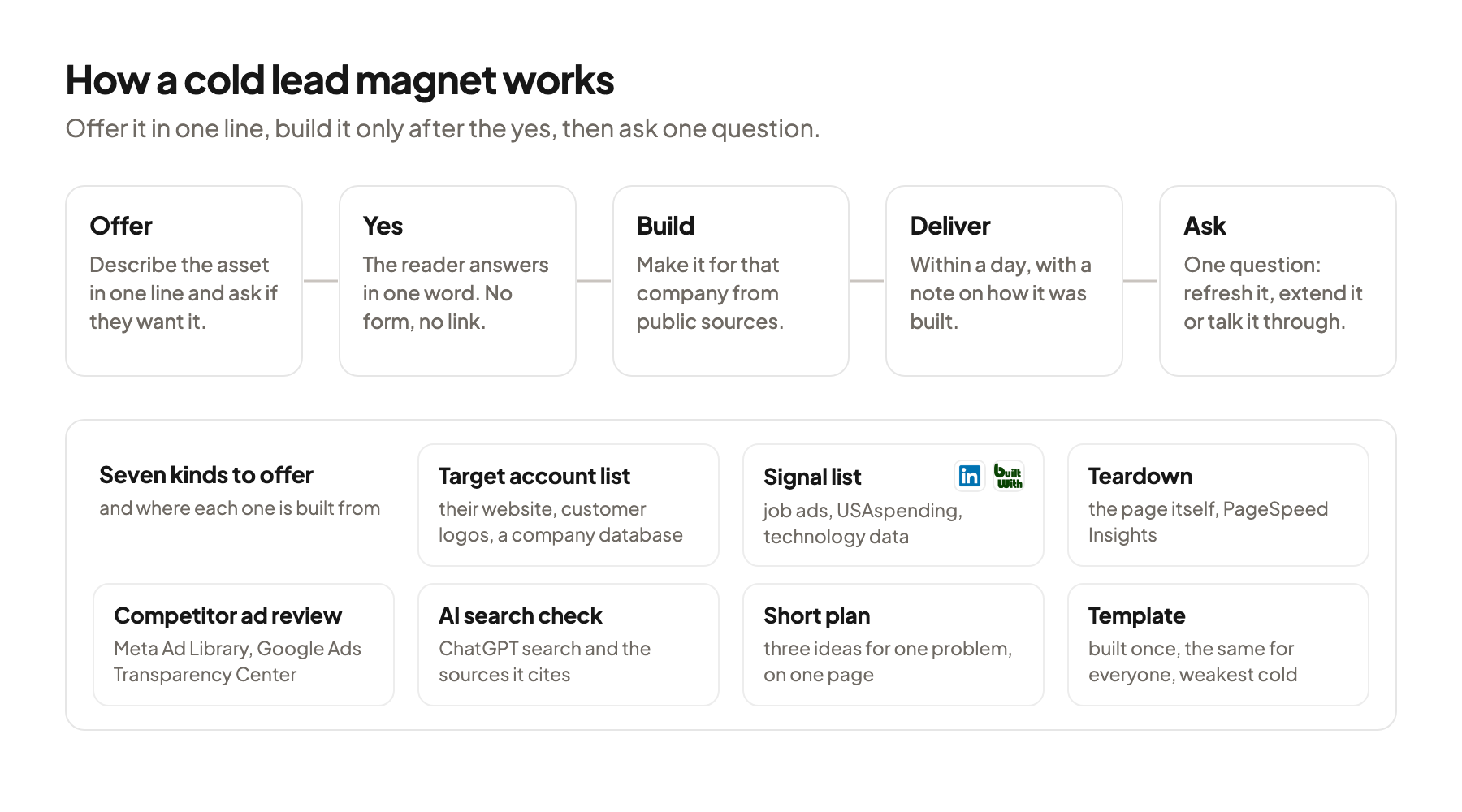
My rule for cold outreach is to never pitch the call cold. The first email offers an asset, and I build it only after the reader says yes.
Most readers won’t answer, and that’s normal. If you build an asset for every account before the campaign goes out, most of that work goes to people who never reply. Offer first, and the work goes only to readers who asked for it.
The first email stays plain. An asset you haven’t built yet can’t be attached or linked. That suits the first email well. lemlist’s help center advises to “Limit links to 1 maximum per email” and “ideally 0 in your initial cold outreach” (lemlist Help). If you send the first step as plain text in Instantly, hyperlinks in Step 1 “are displayed as plain text URLs,” so a link to a finished asset would show up as a raw address anyway.
Build one before the campaign starts. Offering something you can’t deliver quickly is worse than offering nothing. Before you send, build the asset once for a test account. Note how long it took and which sources you used. In my view you should be able to send it within a day of the yes, and the test tells you whether you can.
Keep the promise small. “A short list of the companies in Arizona that posted a controller role this month” is a promise you can keep in a day. “A full market analysis” isn’t, and the reader can tell.
Seven kinds of b2b lead magnets you can offer cold
Cold assets fall into seven kinds. Most are built from public sources, so you can make them without access to the reader’s systems.
| Kind | What the reader gets | Built from | Fits when you sell |
|---|---|---|---|
| Target account list | Companies that look like the reader’s best customers | Their website, customer logos, a company database | Lead generation, data or outbound services |
| Signal list | Companies where something just changed, like a new hire or a won contract | Job ads, government award data, technology changes | Anything that gets more useful after that change |
| Teardown | A short review of one public thing, like their website or job ads | The page itself, a page speed report | Web, marketing or hiring services |
| Competitor ad review | What two or three competitors advertise right now | Meta Ad Library, Google Ads Transparency Center | Paid ads, creative or positioning work |
| AI search check | What an AI assistant answers to a buyer’s question in their category | ChatGPT search and the sources it cites | SEO, content or PR work |
| Short plan | Three ideas for one problem, on one page or in a short video | Your own judgment plus the public sources above | Consulting and agency services |
| Template or checklist | A reusable file, the same for every reader | Your own work, built once | Any, as a weaker fallback |
Target account lists and signal lists show your work directly. A list of accounts is useful the day it arrives, and the reader can check a few rows in minutes. A signal list adds a reason to act now. I’d use one signal per list, so the email can say in one line what every row has in common. How to find companies that are hiring for a role is covered in how to find companies that are hiring for outbound.
Public data sources make signal lists possible. The USAspending API, run by the U.S. Department of the Treasury, lets anyone see “who received federal contracts or grants,” with filters by date and a field for the recipient’s name. BuiltWith says its data can “build high intent lists using tech signals,” for example companies that started using a tool your product works with.
A teardown reviews one public thing. Google’s PageSpeed Insights “reports on the user experience of a page on both mobile and desktop devices,” with suggestions for improvement. A teardown turns that report, or your own reading of a pricing page or a job ad, into three plain points the reader can act on.
A competitor ad review uses the platforms’ own libraries. Meta says its Ad Library “contains all active ads that are shown across Meta technologies,” and that a search for an advertiser shows the “ad creative and copy.” Google provides “a searchable repository of advertisers and the ads they’ve served” on Search, Display, Gmail and YouTube in its Ads Transparency Center.
An AI search check shows where the reader is missing. Ask ChatGPT search the question a buyer in their category would ask, note whether the reader’s company appears, and list the sources the answer cites. OpenAI’s help center describes a Sources view with the cited pages. Record the date and the exact question, because answers can change.
A template or checklist is the exception. It’s the only kind you build once and send to everyone, so it’s also the least specific. I’d keep it for a follow-up or for LinkedIn content, and lead the first email with one of the specific kinds.
B2B lead magnet examples by what you sell
The right asset is a small free sample of the work you’d be paid for. Here are examples for common US B2B sellers.
| What you sell | Asset to offer | Line in the email |
|---|---|---|
| Recruiting for engineering roles | Companies in Texas that posted several backend roles this month, with the hiring manager where public | “Want the list of Texas companies hiring backend engineers this month?” |
| Paid search for B2B software | A review of the search ads their two closest competitors run now | “Should I send over what your two closest competitors are advertising on Google right now?” |
| Website design and development | A teardown of their homepage and pricing page on mobile | “Want the three things I’d fix on your pricing page, in a short doc?” |
| Software for federal contractors | Companies in Virginia that won a federal contract award last quarter | “Want the list of Virginia companies that won a federal award last quarter?” |
| SEO and content | An AI search check for the question their buyers ask | “Want to see what ChatGPT answers when someone asks for a payroll provider in Denver, and which pages it cites?” |
| An app that works with HubSpot | Companies in their target segment that recently started using HubSpot | “Should I send the list of companies in your segment that moved to HubSpot recently?” |
Match the asset to the paid work. A recruiting firm that offers a website teardown confuses the reader about what it sells. When the asset is a sample of the service, the reader learns what you do by using it.
A list of accounts in the reader’s market, a review of their own page or an ad review of their own competitors gets read. A report about your industry in general gets filed.
Check that the source exists before you offer. If the signal behind a list is rare in the reader’s market, the list comes back with a handful of rows. Count it once for a test account, and pick another asset if the count is too small to be useful. Sizing a list before you write is covered in how to size your first outbound campaign.
How to describe the asset in the first email
Describe the asset in one concrete line: what it is, what it’s based on, and how much of it there is.
Name the thing, the source and the scope. “A list of the Arizona companies that posted a controller role this month, with the finance lead for each” says what it is, where it comes from and how big it is. “Some ideas on how we could help” says none of it, and reads like a call request.
Keep the email short and ask one thing. Instantly’s 2026 benchmark, based on its own platform data from 2025, says elite performers average fewer than 80 words per first email and that “Multiple CTAs dilute focus.” The asset offer is that single ask.
Don’t say how you found them. The signal decides whom you write to. It doesn’t belong in the email as a sentence like “I saw your post” or “I noticed you visited our site.” Write about the reader’s situation and the asset, and leave out how you know.
Here is how a short first email with an asset offer can look:
Subject: controllers hiring in Arizona

Hi {first_name},

A company that just posted a controller role is about to have someone new owning the month-end close.

I put together a short list of the Arizona companies that posted a controller role this month, with the finance lead for each.

Want me to send it over?

{your_name}
The example says “I put together” because a list like this is quick to build and goes out within a day of the yes. If your asset takes longer, write “I can put together” instead, so the promise matches what happens next.
Write the asset offer when you write the first line. The opening line and the offer should talk about the same thing. Why the first line comes before the list is explained in write the first line before you build the list.
Deliver the asset and turn the yes into a conversation
The yes starts the real work. Build the asset for that reader, deliver it quickly and end the delivery with one question.
Share lists as a sheet anyone with the link can open. In Google Drive, “Anyone with the link” means anyone who has it “can open the file without signing in to a Google Account” and can view it. Google notes that work accounts may restrict external link sharing, so check that the link opens in a private browser window before you send it.
Show how you built it. Add a second tab with the sources, the date you checked them and what you left out. That shows the reader how you work. A worked example of a list built this way is the give-first cold email.
Check a few rows by hand before you send. The reader judges the asset by the first rows they open. A row with a wrong name or an expired signal costs more trust than an empty cell. How to check a list is in how to check a lead list before anyone sees a row.
End with one question about the asset. Ask whether they want it refreshed every month, built for a second region, or talked through on a short call. Asking for a call now is a much smaller step, because the reader has seen your work.
Tag every reply with the asset you offered. Compare kinds of asset in the same segment, and change only the asset line between two versions, so you know what caused the difference.
Where this usually goes wrong
- Building the asset before anyone asks. Offer it in the first email and build it only for readers who say yes.
- Offering a generic ebook or checklist. Lead with an asset about the reader’s company, market or competitors.
- Describing the asset vaguely. Say in one line what it is, what it’s based on and how big it is.
- Attaching or linking the asset in the first email. Keep the first email free of files and links, and send the asset after the yes.
- Saying how you found the reader. Write about their situation and the asset, never about the signal that picked them.
Where to start
Write down the paid service you’d most like to sell, and pick the one kind of asset from the table that is a small sample of it. Build it once for a test account, note how long it took, and write the one line that describes it. Then send that offer to a small batch of accounts before you change anything else.
B2B lead magnets work in cold outreach when the reader knows exactly what a yes gets them and the asset is about their company, not yours. If you’d like someone to look at your offer and the setup behind it with you, book a 30-minute system check.
Pick your next step
Build it yourself
If you have the time to build and maintain it. The guide walks through every step.
Get the free target market map
If you haven't run outbound yet. Your market, its buying signals and who to contact first.
Book a system check
If you want it built in your own tools. 30 minutes on your market, outbound and sales capacity.
FAQ
What is a lead magnet in B2B?
A lead magnet is something useful a company gives away so a potential buyer starts a conversation. Inbound lead magnets are guides or templates behind a form on a website. In cold outreach, the lead magnet is a small asset made for the reader’s company, offered in the first email in exchange for a reply.
What are good B2B lead magnet examples for cold email?
Good examples are short and specific to the reader: a list of accounts like their best customers, a list of companies that just made a relevant hire, a teardown of their pricing page or a review of their competitors’ current ads. Pick the one that previews the work you’d be paid for.
Should I build the lead magnet before I send the email?
I’d build it only after the reader says yes. Before the campaign, build one for a test account to know how long it takes and that you can deliver within a day. Building one for every account means most of the work goes to readers who never answer.
Do lead magnets work on LinkedIn too?
The same offer fits a LinkedIn message after a connection is accepted. Keep it to one line and one question, and send the asset as a link once the reader has answered.
How do I measure whether a lead magnet works?
Tag every reply with the asset you offered and count how many readers said yes to it. Compare two assets in the same segment and change only the line that describes the asset, so the difference has one cause.
Sources (11)
- About the Meta Ad Library, Meta
- Ads transparency, Google
- About PageSpeed Insights, Google
- Searching the web with ChatGPT, OpenAI
- Share files from Google Drive, Google
- Create and customize forms, HubSpot
- Should you track clicks and opens in cold email campaigns, lemlist
- Link tracking, Instantly
- Cold Email Benchmark Report 2026, Instantly
- USAspending API, U.S. Department of the Treasury
- BuiltWith, BuiltWith