Your sending domain shows up on a blocklist, or more of your cold emails get rejected than last week, and someone on a forum says you hit spam traps. You open your list and have no idea which rows they could be.
This article explains the three main types, what each says about your list, how they get onto a cold email list and how list quality keeps them off.
Key takeaways
- A spam trap is an email address that never signs up for anything and exists to catch senders. Operators keep them secret, so you can’t look one up or remove it by hand.
- Pristine traps point to scraped or bought addresses, recycled traps point to old lists and missing bounce handling, and typo traps point to addresses nobody confirmed.
- Verifiers flag some known traps, and MillionVerifier says no verifier can remove them all. Treat a verifier result as one filter among several.
- The fix is upstream: know where every address came from, verify close to the send, drop hard bounces at once and never revive an old list without checking it again.
What a spam trap is
A spam trap is an email address that exists only to record who sends mail to it. Nobody uses it to sign up for anything.
The working definition comes from M3AAWG, the industry group of mailbox providers and email senders. Its 2023 guide calls a spam trap “an email address used to collect, record, and monitor spam and other unsolicited or abusive email” (M3AAWG, 2023). Traps look like any other address and exist on company domains as well as on free mail services.
Traps never send mail and never subscribe, so any message that reaches one came from a sender who added the address on their own. The operator records which IP addresses and domains send to it. M3AAWG says that data is often passed on through DNS blocklists, public lists of IPs and domains that many mail servers check before they accept mail. One trap hit can therefore affect your mail at companies that never ran the trap.
Spamhaus, one of the best-known blocklist operators, frames traps as a symptom. Its guide asks senders to “view spamtraps as proof of a data collection or hygiene issue” (Spamhaus, 2022). It also says spamtraps “are never revealed by their owners”, because a known trap would simply be deleted while the cause stays.
The three main types: pristine, recycled and typo
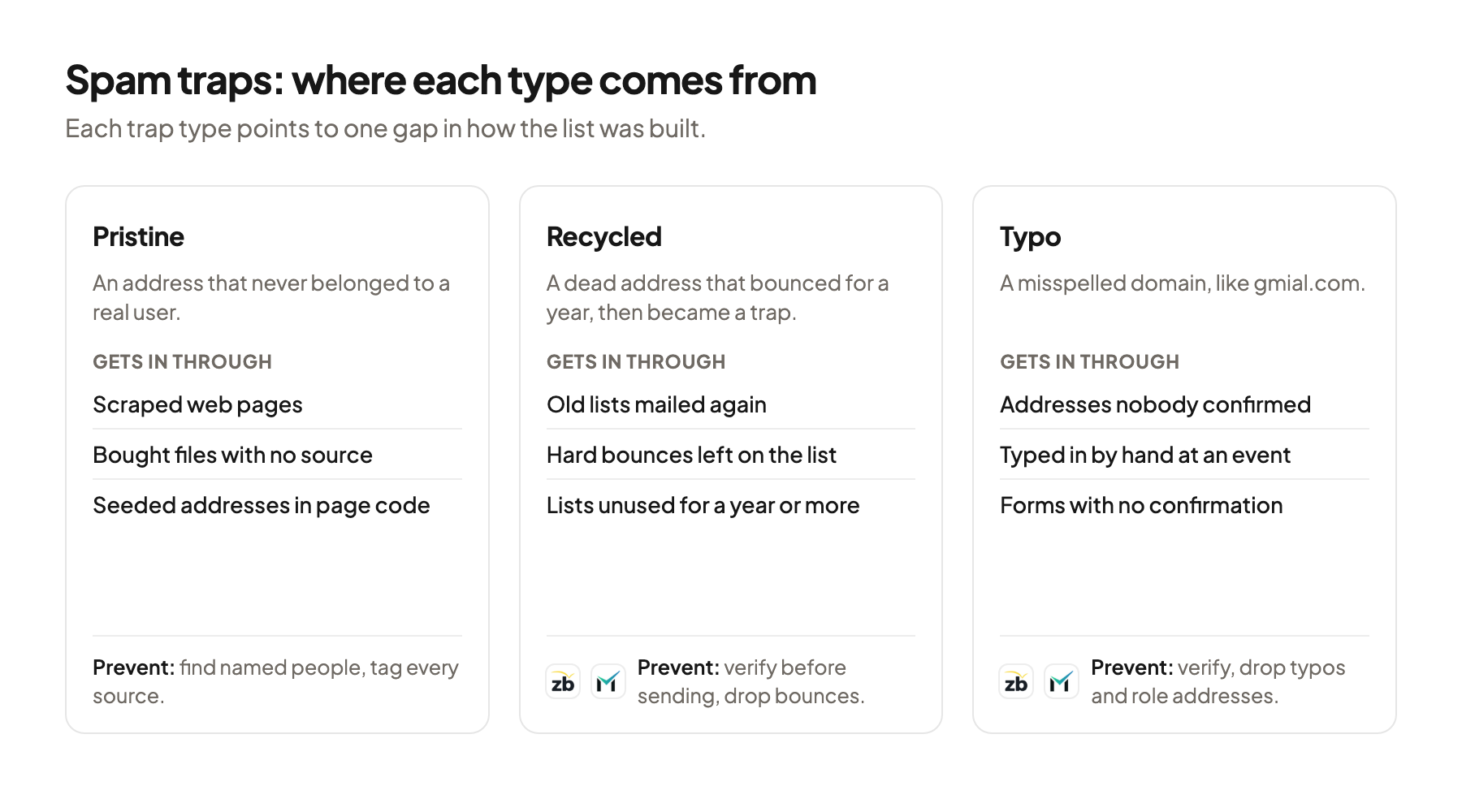
Most guides sort spam traps into three types, and each type points to a different gap in how the list was built. The table follows M3AAWG’s taxonomy.
| Type | What it is | What a hit usually says |
|---|---|---|
| Pristine (pure) | An address that never belonged to a real user before it became a trap | Addresses were scraped from websites, guessed at random or bought |
| Recycled | A real address that went unused, was shut off and later turned into a trap | The list is old, or hard bounces weren’t removed |
| Typo | An address with a common misspelling, usually in the domain, like gmial.com | Nobody confirmed the address when it was collected |
Pristine traps are the most serious sign. M3AAWG says a pristine hit “is frequently the result of web harvesting, address space probing, or dictionary attacks” and “may be a strong indicator of the presence of purchased lists.” Web harvesting means software that copies addresses from web pages. Spamhaus adds seeded traps, addresses placed where no human visitor looks, for example in a page’s source code. Only a scraper picks them up.
Recycled traps start as real addresses. M3AAWG suggests at least 12 months of inactivity before an old address becomes a trap. Its spamtrap operations guide asks operators to reject mail to it with a standard “no such user” error for at least twelve contiguous months first (M3AAWG, 2016). Spamhaus calls these dead address traps and adds dead domain traps, expired domains that trap owners buy to collect the mail that still arrives.
That year of hard bounces is your warning. A sender who removes every hard bounce never reaches the point where the address quietly accepts mail again. A sender who keeps mailing an old list without bounce handling does.
Typo traps are the mildest type. Spamhaus says they “can contain a lot of real mail, and are generally weighted accordingly.” One way in is a mistyped address collected at a trade show.
Spamhaus lists one more kind that matters for B2B lists. Its live traps include role addresses from domain registration records, such as postmaster@, abuse@ and admin@. Spamhaus says these “should almost NEVER be on a marketing mailing list.”
How spam traps end up on a cold email list
Spam traps get onto a list through the way the list was built, and M3AAWG’s entry points read like common outbound shortcuts.
M3AAWG names these sources in its 2023 guide:
- Addresses harvested off websites, whether by a tool or by hand
- Purchased, rented or appended lists
- Lists of trade show participants
- Typos in addresses typed in at a point of sale
- Sign-up forms that never confirm the address
For a cold email list, scraping and unexplained files carry most of the risk. A tool that collects every address on a set of websites also collects any seeded trap placed there. A ready-made file from a source that can’t say where its addresses came from may hold the same scrape. Spamhaus says seeded traps show a sender “is either scraping addresses from the web or is buying lists from someone else who is scraping addresses.”
Age is the next risk. B2B addresses go stale because people change jobs. Hunter re-verified 1,278 valid addresses every week, and after 8 weeks 2.3% were invalid (Hunter, 2025). An address that dies today hard bounces for a while, and on a list nobody cleans it can come back as a recycled trap.
Role addresses are the last risk on B2B lists. Many exports include info@ or admin@ when no named person was found. ZeroBounce marks role-based addresses as do not mail because they “strongly correlate to people reporting emails sent to them as spam and abuse.”
Google’s sender guidelines say “Don’t purchase email addresses from other companies”, and Yahoo says “Don’t purchase mailing lists”. Those rules are written for subscription mail to personal accounts. Cold email to company domains has no sign-up step, so the source and age of each address are the controls you have. The complete guide to B2B contact data compares the sources.
How you notice a spam trap hit
You usually notice a spam trap hit through its effects, because the trap itself looks like any other address. M3AAWG says it’s “often difficult to know” when a message went to one.
The two signs M3AAWG names are a blocklist listing of your domain or IP and a rise in rejected mail. Neither tells you which address caused it. Some monitoring companies run their own trap networks and report how much of your mail reaches them, without naming the addresses.
Don’t go hunting for the address. Spamhaus says searching for the trap and deleting it treats the symptom, and the source that delivered one trap will deliver more. M3AAWG’s audit questions start with “How were the contact lists created” and ask whether you can “identify the source of the problem data and remove all data acquired through that source.” In practice you trace the hit to a send date, then to the segment mailed that day, then to the import behind it.
Say a campaign to 1,500 contacts runs for two weeks, and in week two your domain appears on a blocklist. The list combined a scrape of association member pages, a file bought last year and a fresh export from a contact database. The scrape and the old file match the pristine and recycled patterns. I would pause both and keep the fresh export running.
A clean spam rate doesn’t rule out trap hits. Google’s spam rate in Postmaster Tools counts complaints from real people, and a trap never clicks a spam button. Blocklist checks belong in the routine from how to send cold emails without going to spam.
What email verifiers can and can’t catch
An email verifier checks whether an address exists before you send. On spam traps, the vendors themselves say different things about how much a check can do.
| Verifier | What it says about spam traps (vendor statement) |
|---|---|
| ZeroBounce | Has a “spamtrap” status for addresses “believed to be spam traps”, and says “We don’t know all the spam trap email addresses, but we know many of them.” Flags addresses with words like spam@ as “possible_trap” and common domain misspellings as “possible_typo” |
| NeverBounce | Says its process tries “to detect known spam traps” and labels those addresses invalid |
| MillionVerifier | Says “Email verifiers cannot confirm and remove spam traps”, because mailbox providers never publish or share their trap lists |
Two vendors say they catch known traps, and none claims to know every trap. That fits operators keeping traps secret.
Verification still removes the conditions that create traps. It catches addresses that already bounce, so a dead mailbox leaves your list long before it could become a recycled trap. It catches misspelled domains and role addresses. It can’t catch a working pristine trap from a scraped page, because to a mail server that is a real, deliverable mailbox.
So the verifier is the second filter, after the source. A clean result on a scraped file tells you the addresses exist, and nothing about who owns them. This list check shows what to test before the first row reaches a campaign.
How to keep spam traps off your list
You keep spam traps off a list by controlling where addresses come from and how long they sit before you mail them. M3AAWG’s conclusion is that a trap “is a sign of an underlying problem” with how addresses were acquired and validated.
Tag every row with its source and date. Record the vendor or method behind each contact and the day you pulled it, before it enters your sending tool. After a blocklist listing you can then remove “all data acquired through that source”, in M3AAWG’s words, with one filter.
Find named people instead of scraping pages. Seeded traps sit exactly where a scraper reads. Use a contact data provider or a public record to find the person, then find and verify that person’s address. If you use a ready-made file at all, use one whose source can say where each address came from. In my view an unexplained file belongs in its own small test, never in the main campaign.
Verify close to the send. ZeroBounce recommends verifying a list at least once per quarter. For cold email I’d verify right before each campaign, because the Hunter sample shows addresses going invalid within weeks.
Remove hard bounces at once and for good. Yahoo tells senders not to retry permanent 5xx errors and to have a policy for removing those addresses. A suppressed address never reaches the stage where it turns into a recycled trap. M3AAWG also suggests suppressing recipients who stay “chronically unengaged or non-deliverable.”
Check any list again that sat unused for a long time. M3AAWG warns about segments that get mail after “an extended time” without it, because addresses may have turned into traps in the meantime. A list older than the 12 months M3AAWG names needs a fresh check first.
Keep role and registration addresses out of cold campaigns. Drop postmaster@, abuse@ and admin@ always, and leave info@ and sales@ out of the main campaign.
Where this usually goes wrong
- Hunting for the trap address after a blocklist listing. Trace the hit to the send, the segment and the source, then remove that whole source.
- Scraping addresses from websites. Seeded traps sit where only scrapers look, so find named people and verify their addresses instead.
- Reviving an old list without a new check. Re-verify anything older than a few months, and treat a list unused for a year as new data.
- Keeping hard bounces on the list. Suppress every permanent bounce at once so a dead address never comes back as a recycled trap.
- Trusting a verifier to remove all traps. MillionVerifier says no verifier can, so control the source first.
Where to start
Add two columns to your current list: source and date pulled. Keep every row you can’t fill in out of the next campaign until you know where it came from.
Spam traps are a symptom of how a list was built, so the prevention sits in the source, the age and the bounce handling of every address. If you’d like a second look at your list and setup before the next send, book a 30-minute system check.
Pick your next step
Build it yourself
If you have the time to build and maintain it. The guide walks through every step.
Get the free target market map
If you haven't run outbound yet. Your market, its buying signals and who to contact first.
Book a system check
If you want it built in your own tools. 30 minutes on your market, outbound and sales capacity.
FAQ
What is a spam trap in email?
An address that never signs up for anything and exists to record who mails it. Operators use the data to rate sending IPs and domains, and blocklists often pass it on.
What are the main types of spam traps?
The three main types are pristine, recycled and typo traps. Pristine traps never belonged to a real user, recycled traps are old addresses turned into traps after a long period of bouncing, and typo traps sit on misspelled domains like gmial.com.
How do I know if I hit a spam trap?
You see the effects. M3AAWG names a blocklist listing of your domain or IP and a rise in rejected mail, and operators never reveal which address was hit.
Can an email verifier remove spam traps?
Only partly. ZeroBounce and NeverBounce say they flag known traps, and MillionVerifier says no verifier can remove them all. A verifier still removes bounces, misspelled domains and role addresses.
How long before an old address becomes a recycled spam trap?
M3AAWG suggests at least 12 months of inactivity, and Spamhaus describes addresses that hard bounce for 12 months or more before they are turned back on as traps. Removing hard bounces when they happen keeps those addresses off your list.
Are role addresses like info@ spam traps?
Some are. Spamhaus counts registration addresses like abuse@ and postmaster@ as live traps that should almost never be mailed. ZeroBounce marks role addresses as do not mail because they correlate with spam complaints.
Sources (11)
- Help! I Hit a Spam Trap!, M3AAWG
- Best Current Practices for Building and Operating a Spamtrap, M3AAWG
- Spamtraps: fix the problem, not the symptom, Spamhaus
- Email sender guidelines, Google
- Sender best practices, Yahoo
- Yahoo SMTP error codes, Yahoo
- Status codes (API v2), ZeroBounce
- How often should I verify my email list, ZeroBounce
- Does NeverBounce offer spam trap removal, NeverBounce
- Spam traps, MillionVerifier
- Email data decay, Hunter