Your email sequence is written, and now you want to add LinkedIn and a few calls for the accounts that matter most. Most guides to a sales cadence stop at a list of touches per day, without saying which channel carries which message or what happens when someone accepts on LinkedIn but never answers an email.
This guide covers the part between the channels: what each one is for, in what order they run, which rules move a person from one to the next, and when everything stops. It ends with three example cadences and how HubSpot, Apollo, lemlist and Outreach set up calls and LinkedIn steps.
Key takeaways
- A sales cadence runs email, LinkedIn and phone as one plan per person. Each channel gets one job, and a reply anywhere stops every channel at once.
- Email carries the full message and the follow-ups. LinkedIn adds a familiar face for the top accounts, and calls come last, for people who already know your name.
- LinkedIn forbids bots for adding contacts or sending messages, so set LinkedIn and phone steps up as manual tasks with reminders in your sending tool or CRM.
- Start with one cadence for your top accounts only. Everyone else on the list gets email, so the extra manual work stays small enough to finish every day.
What a sales cadence adds to an email sequence
A sales cadence is a planned order of touches across channels for one person, with set days, jobs and a stop rule.
An email sequence is one channel on a timer. A cadence adds steps that a person does by hand, like a connection request or a call, and those need a reminder, an owner and a due date. That is why most tools build them as tasks. HubSpot, for example, describes a call task as “a task reminder to manually call the contact enrolled in the sequence” (HubSpot Knowledge Base, 2026).
Tools use “cadence” and “sequence” for the same thing. In this guide, a sequence means the email steps and a cadence means the whole plan across channels.
The email steps still do most of the work. Instantly’s Cold Email Benchmark Report 2026 puts 58% of all replies on the first email of a sequence, based on 2025 data from its own platform. So a cadence starts with a good first email. If that isn’t written yet, write the first line before you build the list.
Pick the channels before you plan the order. Whether your market reads LinkedIn at all is covered in cold email vs LinkedIn. This guide assumes email works for your list and you want to add LinkedIn and phone for part of it.
Give each channel one job
Each channel should do one thing the others can’t. When two channels carry the same pitch, the person just sees the same ask twice.
lemlist’s help center puts the roles this way: “Use email for your main value message and follow-ups”, “Use LinkedIn for “warm” touches and context”, and treat calls as “a “high-intent” touch”, used “when the lead is qualified or when your offer is time-sensitive” (lemlist Help Center, 2026). That is a vendor’s advice without published data, and in my view it matches how buyers read each channel.
| Channel | Its job in the cadence | What a step looks like | Who does it |
|---|---|---|---|
| Carries the reason you’re writing, the offer and the follow-ups | Automated emails, plain text, in one thread | The sending tool | |
| Puts a face and a name next to the email | Connection request, then a short message once accepted | The sender, by hand | |
| Phone | Gets a quick answer from someone who has seen your name | A short call, a voicemail that points to the email | The sender, by hand |
Email holds the full message. It is the one channel where you can explain the problem and make the offer in a few lines the reader can forward. In my view the first email should offer something small and useful instead of asking for a call.
LinkedIn holds the relationship. A connection request puts your profile in front of the person, and once they accept you can write to them. LinkedIn says “You can only message your connections”, so a LinkedIn message step only works after an accepted request. I send connection requests without a note. Free accounts can add a note to only a few requests per month anyway, and each note can be up to 200 characters, per LinkedIn’s help pages.
Phone holds the short answer. In my view a call opens with the email you sent and asks one question, and the voicemail says the same in a few seconds.
LinkedIn steps stay manual. LinkedIn’s User Agreement forbids “bots or other unauthorized automated methods” to access the service, for example to add contacts or send messages (LinkedIn User Agreement, 2025). Its help page says members who use such tools “risk having their accounts restricted or shut down.” Some sending tools offer automated LinkedIn steps, and the risk sits with the person whose profile sends them. I’d set LinkedIn steps up as tasks that a person completes on LinkedIn.
How to order the channels over three weeks
Lead with email, add LinkedIn in the first days, and leave calls for the second half, after the person has seen your name twice.
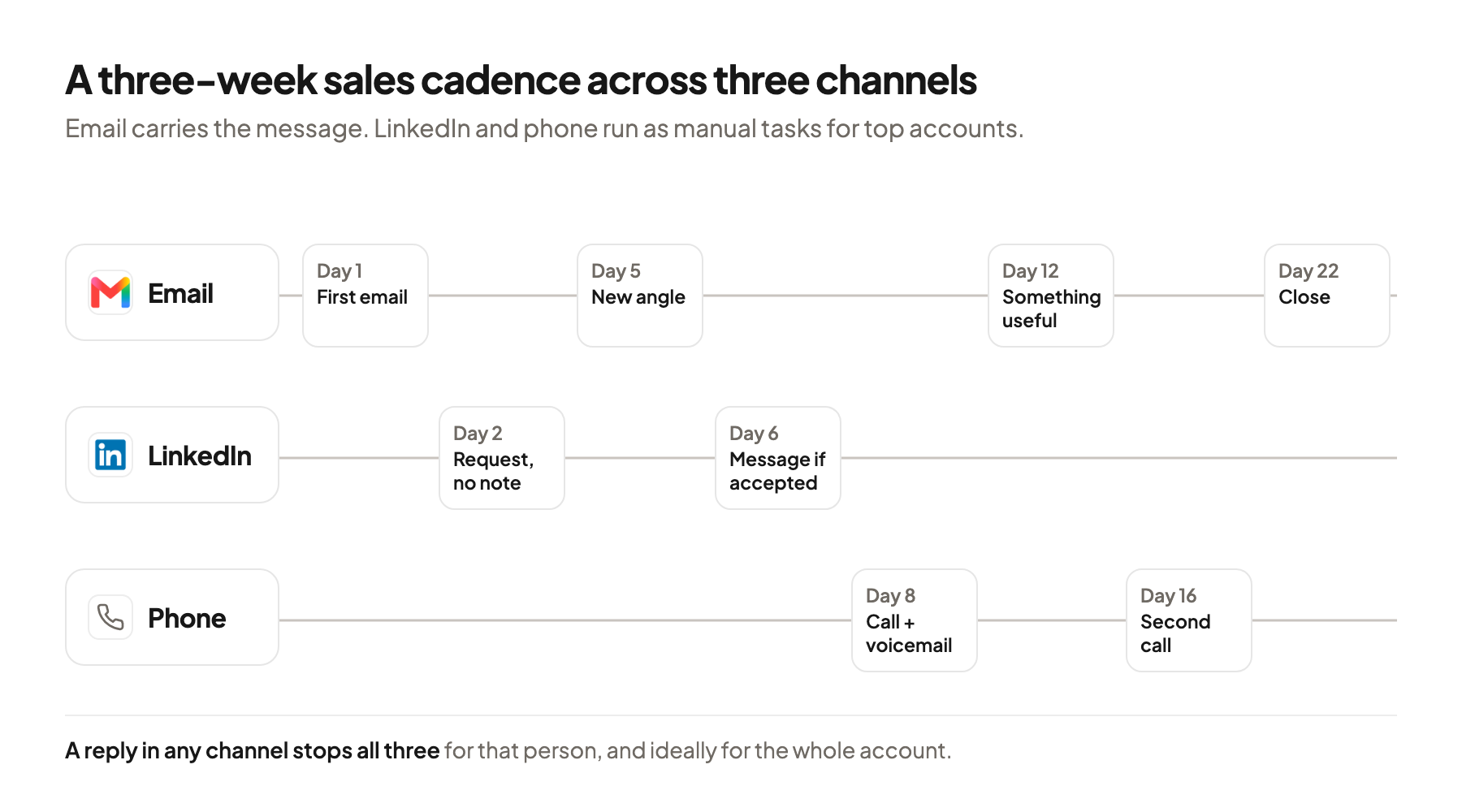
| Day | Channel | Step | Job |
|---|---|---|---|
| 1 | First email | The reason you’re writing and a small offer | |
| 2 | Connection request, no note | Your name and face next to the email | |
| 5 | Second email | A new angle on the same problem | |
| 6 | Short message, only if accepted | One line that points to the email | |
| 8 | Phone | First call, voicemail if no answer | One question about the email |
| 12 | Third email | Something useful they can keep | |
| 16 | Phone | Second call | A last direct question |
| 22 | Last email | A clean close with an easy way back |
Email opens because it carries the message. The connection request on day 2 lands on someone who may have read your email. The LinkedIn message on day 6 says you wrote by email and adds one line of context.
Space the direct asks. lemlist calls emails, messages and calls that ask for something “hard touches” and says they “should be spaced so prospects don’t feel chased.” In the table, no two fall on the same day. Instantly suggests spacing email touches “3-4 days apart”, so the gaps start close to that and grow later.
Check how your tool counts days. HubSpot sets delays in business days, and other tools count calendar days or sending days, so a plan on paper can drift by a weekend per step.
Rules that move people between channels and stop the cadence
A cadence needs rules for three moments: when a channel isn’t possible, when someone reacts, and when someone replies anywhere.
Route by the data you have. Not every person has a LinkedIn profile, a verified email and a phone number. lemlist’s conditions show the pattern: if a lead “Has email address with status Deliverable”, the next step is an email, and if not, a LinkedIn invitation. A “Has phone number” check keeps calls to records with a number.
Branch on the connection request. lemlist recommends waiting 3 to 5 days for a request to be accepted before the next LinkedIn step. If the person accepts, the next step is a LinkedIn message. If not, the cadence carries on by email and phone, and the request stays open.
Stop everything on a reply. A reply in any channel should end every step for that person. HubSpot unenrolls a contact who replies to a sequence email or books a meeting. Outreach finishes a prospect when a call is logged as answered, and lemlist stops once you mark a lead as interested or not interested. LinkedIn replies often don’t reach the sending tool, so whoever reads them has to mark them.
Stop the whole account when one person replies. Instantly has a setting that stops emails to all leads at the same company once one of them replies. In a cadence this matters more, because a colleague may get a call while their coworker is already talking to you.
Log every touch on one record. The CRM should show every email, request, call and reply per person. HubSpot also allows a contact in only one sequence at a time, so two cadences can’t run on the same person. For a setup that collects every channel in one place, see the complete guide to headless GTM.
Sales cadence examples for three kinds of lists
The right cadence depends on the list: how many people are on it, whether they read LinkedIn, and whether you have a reason to write now.
lemlist publishes two templates as a starting point. Its 30-day version mixes LinkedIn visits, one LinkedIn message or invite, four emails and two calls. Its 14-day version has three emails, two LinkedIn touches and a call on day 13, and lemlist suggests it for warmer leads. The examples below adapt that idea to three lists.
Example 1: top accounts on a larger list
Say your campaign list has 600 people at 300 companies, and 50 of those companies are the ones you most want. Those 50 get the full three-week cadence from the table above. The other 250 companies get the email steps only.
In the example, two people per top account is 100 people for LinkedIn and phone. At HeyReach’s default of 25 connection requests per day, that’s four sending days. LinkedIn publishes no limit.
Split by tier before you write anything. The tier decides how many channels a person gets, so the manual work goes where you expect it to pay off. To size the list first, see how to size your first outbound campaign.
Example 2: a signal-led cadence after a job change
A signal is an event that suggests a company may need you now, like a new VP of Sales at a software company in Colorado. Here LinkedIn opens, because the person is new and building their network.
- Day 1, LinkedIn. Connection request without a note.
- Day 2, email. First email that names the new role and offers one useful thing for their first months.
- Day 5, LinkedIn. If accepted, a short message that refers to the email.
- Day 8, email. A second angle on the same problem.
- Day 12, phone. One call, only if the record has a direct number.
- Day 15, email. Close the thread.
Speed matters more than length here. The reason to write fades as the person settles in, so this cadence is shorter. For triggers in open roles, see how to turn job ads into LinkedIn outreach.
Example 3: email and phone for buyers who aren’t on LinkedIn
Some buyers have an empty LinkedIn profile or none, like owners of independent accounting firms in Ohio. For them the cadence runs on email and phone.
- Day 1, email. The reason you’re writing and a small offer.
- Day 5, email. A new angle.
- Day 8, phone. A call to the office number, voicemail that names the email.
- Day 12, email. Something useful.
- Day 16, phone. A second call.
- Day 22, email. Close.
Check the phone data first. Calls only work if the numbers reach the right person, so check the lead list before anyone sees a row, phone numbers included.
Set up the cadence in your sending tool or CRM
Most tools run the emails on their own and turn LinkedIn and phone steps into tasks with a due date. The differences are in how tasks pause the cadence and what counts as finished.
| Tool | Call steps | LinkedIn steps | Worth knowing |
|---|---|---|---|
| HubSpot Sequences | Call task, a reminder to call by hand | Connection request and InMail tasks through the Sales Navigator integration | Delays in business days. A task can pause the sequence until it’s done. Up to 10 email templates per sequence, tasks unlimited |
| Apollo | Phone call steps, with Apollo’s own dialer | Connection request, message, view profile and view posts as tasks | Apollo reminds the owner to do LinkedIn steps on LinkedIn |
| lemlist | Calls as manual tasks, plus a call status condition | Invite, message, InMail and profile visit steps | LinkedIn steps and conditions need the Multichannel Expert or Enterprise plan |
| Outreach | Phone tasks with a call disposition | LinkedIn tasks | An answered call can finish the prospect. Outreach advises against back-to-back manual email tasks |
HubSpot keeps the LinkedIn text outside LinkedIn. When you complete a connection request task, Sales Navigator opens on the contact record, but the note in the task “will not automatically populate” in the LinkedIn box. A person sends every request.
Outreach chains tasks on the same day. Once you finish a phone task, a LinkedIn task can load right after it. Outreach warns that two manual email tasks without a gap “will likely be delayed” by the sequence schedule (Outreach Support, 2026).
lemlist branches inside the sequence. Conditions like “Accepted invite”, “Has phone number” and “Call status”, which checks for answered, no answer or voicemail, decide the next step. A manual task such as “Call the prospect” moves the cadence on once you mark it done.
InMail is a paid fallback. InMail is LinkedIn’s message to people you aren’t connected with. Credits are limited per month, and an InMail that gets a response within 90 days is credited back. I’d keep it for top accounts where the connection request stays unanswered.
Say 100 people are in the cadence and each gets a connection request, a message and two calls over three weeks. That is around 400 manual tasks, or about 25 per sending day over 16 days. If nobody can do that every day, cut the number of accounts and keep every follow-up.
Where this usually goes wrong
- Sending the same pitch in every channel. Give each channel one job, so the LinkedIn message points to the email instead of repeating it.
- Automating LinkedIn steps. LinkedIn’s User Agreement forbids bots for adding contacts or sending messages, so run them as manual tasks.
- Calling before the person knows your name. Put calls in the second half, after two emails and a connection request.
- Not stopping other channels after a reply. Mark LinkedIn and phone replies in the tool so every step for that person, and ideally that account, ends.
- Giving every account the full cadence. Tier the list and keep the manual channels for the accounts you want most.
Where to start
Pick the few dozen accounts you most want from your current list and check three things for each person: a verified email, a LinkedIn profile and a direct phone number. Then build the three-week cadence from the table for those accounts only, with LinkedIn and calls as tasks, and leave the rest of the list on email.
A sales cadence works when each channel has one job, the manual steps fit into a real day, and one reply anywhere stops everything for that person. If you’d like a second opinion on which accounts should get the full cadence, book a 30-minute system check.
Pick your next step
Build it yourself
If you have the time to build and maintain it. The guide walks through every step.
Get the free target market map
If you haven't run outbound yet. Your market, its buying signals and who to contact first.
Book a system check
If you want it built in your own tools. 30 minutes on your market, outbound and sales capacity.
FAQ
What is a sales cadence?
A sales cadence is a planned order of touches across email, LinkedIn and phone for one person over a few weeks. It stops when the person replies.
What is the difference between a sales cadence and a sequence?
Many tools use both words for the same thing. Here a sequence means the automated email steps, and a cadence means the whole plan, including the manual LinkedIn and phone tasks.
How many touches should a sales cadence have?
There is no published standard. In my view six to eight touches over three weeks is enough for a top account, as long as each one adds something new.
Can I automate LinkedIn steps in a cadence?
LinkedIn’s User Agreement forbids bots and unauthorized automated methods for adding contacts or sending messages. HubSpot and Apollo turn LinkedIn steps into reminders that a person completes on LinkedIn.
When should I call in a sales cadence?
I’d call after at least two emails and a connection request, so they know your name. Calls fit top accounts and buyers who aren’t on LinkedIn.
What should stop a sales cadence?
A reply in any channel, a booked meeting or an answered call should stop every step for that person. Many teams also stop the cadence for the whole company once one person replies.
Sources (18)
- Choose a multichannel sequence to build, lemlist Help Center
- How to add LinkedIn steps to your sequence, lemlist Help Center
- How to use conditions in your campaign sequence, lemlist Help Center
- How to add and manage manual tasks in a sequence, lemlist Help Center
- Create and edit sequences, HubSpot Knowledge Base
- Enroll and unenroll contacts in sequences using workflows, HubSpot Knowledge Base
- Multi-Touch Sequence Steps, Outreach Support
- Sequences Overview, Apollo Knowledge Base
- Complete LinkedIn Tasks in a Sequence, Apollo Knowledge Base
- Cold Email Benchmark Report 2026, Instantly
- Campaign options, Instantly
- User Agreement, LinkedIn
- Prohibited software and extensions, LinkedIn Help
- Personalize invitations, LinkedIn Help
- Send messages to connections, LinkedIn Help
- Invitation limits, LinkedIn Help
- InMail message credits and renewal process, LinkedIn Help
- How connection request limits work in HeyReach, HeyReach