You have a list of companies, an offer and maybe a month before the first campaign has to show something. Most articles on cold email vs LinkedIn put two reply rates side by side and declare a winner. Those numbers come from different tools that measure different things, so the comparison stops working once you check how each one was counted.
This guide decides by your situation instead: who you sell to, how big your list is, where your buyers read and how much time your team has. Every number below names its source and how it was counted.
Key takeaways
- The published reply rates for cold email and LinkedIn divide by different things, so they can’t be compared directly. Decide by your market and your team’s capacity instead.
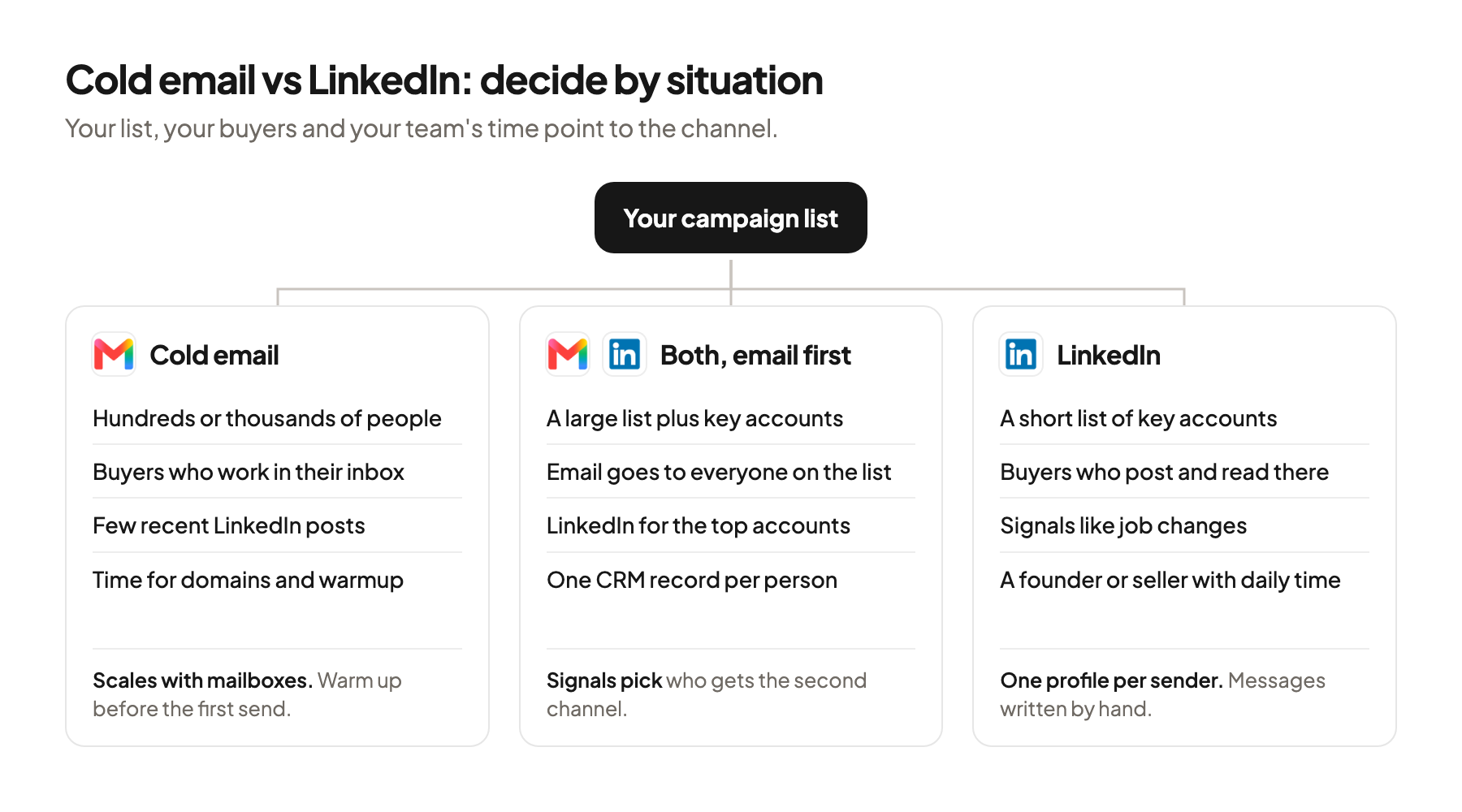
- Cold email scales with mailboxes and suits lists of hundreds or thousands of people. LinkedIn runs through one personal profile per sender, so it suits short lists of accounts you really want.
- Check where your buyers are before you pick. If most people on your list barely use LinkedIn, the channel choice is already made for you.
- When you have the capacity for both, start with cold email to the full list and add LinkedIn for the accounts that matter most.
Why the published reply rates don’t compare
The two best-known benchmarks count replies against different bases, so their percentages answer different questions.
Instantly’s Cold Email Benchmark Report 2026 covers January to December 2025 across “billions of cold email interactions”, with no exact count published. It reports an average reply rate of 3.43%, and the top quarter of senders reach 5.5% (Instantly, 2026). The reply rate is replies, follow-ups included, divided by all emails sent. Instantly also found that 58% of replies come from the first email in a sequence, so 42% come from follow-ups.
Expandi’s LinkedIn Outreach Benchmarks 2026 cover May 2025 to April 2026 across the active accounts on Expandi’s platform. The platform averages are 28.5% connection acceptance, 3.0% reply to a connection note and 10.4% reply to messages (Expandi, 2026). The 10.4% counts replies to messages sent to people who already accepted the invitation. That is the second step of the funnel, after most people have dropped out.
| Instantly (cold email) | Expandi (LinkedIn) | |
|---|---|---|
| Period | January to December 2025 | May 2025 to April 2026 |
| Whose data | Instantly’s own platform | Expandi’s own platform |
| Headline rate | 3.43% average reply rate | 10.4% message reply rate |
| Divided by | All emails sent, follow-ups included | Messages to people who already connected |
So 3.43% against 10.4% compares two different things. An honest comparison would count replies per person contacted across the whole funnel, and nobody publishes that with one method for both channels. I’d use each report for rough expectations inside its own channel.
Who you sell to decides most of it
The first question is whether your buyers use LinkedIn at all. LinkedIn reports more than 1.3 billion members, with 290 million or more in North America, a figure that includes Canada (LinkedIn, 2026).
A big network says nothing about your list. A RevOps leader at a US software company may check LinkedIn every day. The owner of a dental practice in Texas may have an empty profile from years ago, or none. Both are B2B buyers, and only one of them reads LinkedIn messages.
For local businesses the standard B2B tools return almost nothing. The owners are not on LinkedIn.
 Jan BerningFounder, Pipecadence
Test it before you decide. Take a sample of 20 people from your list and look them up. Sales Navigator, LinkedIn’s paid search tool for sales, has a filter called “Posted on LinkedIn in 30 days”. If only a few people in the sample have posted, a LinkedIn campaign has few readers on the other end. If you can’t find the companies on LinkedIn at all, this guide shows where to look instead.
The buyer’s job also matters. In my view, people whose work happens in their inbox, like finance, operations and office managers, are easier to reach by email. People whose work includes being visible, like founders, sales leaders and recruiters, are often easier to reach where they post.
How list size limits each channel
Cold email capacity grows with the number of mailboxes you run, and LinkedIn capacity is tied to one personal profile per sender. That makes list size the second deciding question.
Email vendors land between 25 and 50 emails per mailbox per day. Instantly recommends 30 campaign emails per day per account. Smartlead says to keep daily caps within 40 to 50 at the start, warmup included, and lemlist caps a Google mailbox at 50 a day for warmup and campaign together. Instantly also asks for at least 2 weeks of warmup before the first campaign. These are vendor recommendations, and no mailbox provider publishes a cold email limit.
LinkedIn publishes no invitation number. Its help page says invitation limits exist “to prevent misuse and promote thoughtful networking”, and an account that hits them may be blocked from sending invitations, which “typically lasts one week” (LinkedIn Help, 2026). Tool vendors fill the gap with their own values. HeyReach defaults to 25 connection requests per day and caps a sender at 200 a week. Expandi’s blog puts the ceiling for an established free account at about 100 a week.
Say your campaign list has 600 people. At 30 emails per mailbox per day, a three-email sequence is 1,800 emails, so three warmed-up mailboxes finish in about 20 sending days. On LinkedIn, one profile at 25 invitations a day needs 24 days just to invite everyone. If acceptance matches Expandi’s average of 28.5%, about 170 people connect, and only they can receive a regular message.
The math points one way for large lists. A list of a few hundred people fits LinkedIn. A list of thousands needs email, or many LinkedIn senders. To work out how many people belong on the list in the first place, size the campaign before you choose the channel.
Where your buyer reads and when they are ready
Most of your market isn’t shopping today, so the channel also decides how you stay present until someone is. LinkedIn’s B2B Institute puts it as “95% of your potential buyers aren’t ready to buy today”, without publishing the method behind the figure.
LinkedIn shows timing signals inside the channel. A signal is an event that suggests a company may need you now. Sales Navigator has filters like “Changed jobs in last 90 days” and saved searches that notify you when new people match. You see the trigger and send the message in the same place.
Email reaches people who never post. Buyers with no interest in social media still read their inbox, and a thread is easy to forward to a colleague.
InMail sits in between. InMail is LinkedIn’s paid message to people you aren’t connected with. Credits are limited per month: 5 on Premium Career, 15 on Premium Business and 50 on Sales Navigator Core. An InMail that gets a response within 90 days is credited back, so the credits go furthest on accounts where you expect an answer.
What each channel asks of your team
Cold email needs setup before the first send, and LinkedIn needs a person’s time every day.
| Criterion | Cold email | |
|---|---|---|
| Who sends | Separate sending domains and mailboxes | A real person’s own profile |
| Setup before day one | Domains, SPF and DKIM records, about 2 weeks of warmup | A complete profile, Sales Navigator if you search a lot |
| Volume | Grows with mailboxes, vendors say 25 to 50 per mailbox per day | One profile, LinkedIn publishes no number |
| Main risk | Landing in spam, bounced emails | A restricted account |
| Daily work | Check replies and the spam rate | Accept, message and reply by hand |
| Fits | Lists of hundreds or thousands | Short lists of accounts you really want |
Email asks for technical care up front. SPF and DKIM are DNS records that prove a mailbox may send for your domain. The full setup is in how to send cold emails without going to spam. Google’s sender guidelines ask anyone sending to Gmail accounts to keep the spam rate in Postmaster Tools under 0.10% and never reach 0.3%, and Yahoo also names 0.3%. Those rules cover personal Gmail accounts, and Google still filters mail to company accounts on Workspace. Lists also need verification. A catch-all domain is one whose server accepts mail for any address, so a verifier can’t confirm the person exists. MillionVerifier advises against sending to catch-alls from purchased or scraped lists, and a list check before sending catches most of these problems.
LinkedIn asks for a person. Its User Agreement forbids using “bots or other unauthorized automated methods” to access the service, for example to add contacts or send messages (LinkedIn User Agreement, 2025). LinkedIn’s help page adds that members who use such tools “risk having their accounts restricted or shut down.” LinkedIn doesn’t permit third-party tools that automate activity on the site, and the profile at risk is usually the founder’s own.
Replies land in different places. Email replies arrive in mailboxes your team can share. LinkedIn replies arrive in one person’s inbox, and that person has to answer them. A setup that collects replies from every channel in one place, as in headless GTM, makes routing easier, but someone still writes the answers.
When to run both, and in what order
Run both when the list is large enough for email and holds a group of accounts worth personal attention. Then I’d start with email.
Email first, to everyone on the list. It takes the longest to set up, so start the domains and warmup in week one.
LinkedIn second, for the accounts that matter most. Mark the 50 or 100 accounts you would most like to close, and have the founder or a senior seller connect with the people there, as in this LinkedIn outreach guide. I send connection requests without a note. A free account can add a personal note to only a handful of invitations per month anyway, and LinkedIn’s own help pages disagree on whether that’s three or five.
Use signals to pick who gets the second channel. A job change, a new post on a topic you work on or an open role that fits your offer is a reason to write a personal message on LinkedIn. For one way to turn open roles into a campaign, see how to turn job ads into LinkedIn outreach.
Keep one record per person. When both channels touch the same buyer, the CRM has to show both, or someone emails a person who already replied on LinkedIn.
When you don’t need an agency for this
You don’t need outside help to decide between two channels. If your list is under a few hundred people, your buyers are active on LinkedIn and the founder has 30 minutes a day, LinkedIn by hand is a fine first channel. No domains, no warmup, no tools beyond Sales Navigator.
The same goes for a small email test. One or two warmed-up mailboxes and a verified list teach you a lot in a few hundred sends.
Help makes sense when the parts multiply. That point comes with several mailboxes and domains, lists of thousands, two channels touching the same people and a CRM that has to stay clean. That’s the work Pipecadence does. We start with cold email and add LinkedIn as the second channel. Everything runs on your own tool accounts, you get weekly numbers and a monthly keep, change or stop review, and you can take the whole system over at any time.
Where this usually goes wrong
- Comparing reply rates across channels. Instantly divides by emails sent and Expandi by messages to accepted contacts, so check how a number was counted first.
- Choosing LinkedIn for a market that isn’t on it. Look up 20 people from your list before you plan a LinkedIn campaign.
- Planning a large list on one LinkedIn profile. Count the invitations first, since the list size decides the channel.
- Starting email without warmup. Vendors ask for at least 2 weeks, so set up the domains before you write the copy.
- Running both channels without one record per person. Log every touch in the CRM so nobody gets a cold email after replying on LinkedIn.
Where to start
Pull 20 people from your list and check two things for each: whether they have a work email you can verify, and whether they posted on LinkedIn in the last 30 days. The count tells you which channel has readers on the other end.
Cold email vs LinkedIn is settled by your list, your buyers and your team’s hours, and for many teams the answer is email first and LinkedIn for the top accounts. If you’d like a second opinion on your market before you build either, book a 30-minute system check.
Pick your next step
Build it yourself
If you have the time to build and maintain it. The guide walks through every step.
Get the free target market map
If you haven't run outbound yet. Your market, its buying signals and who to contact first.
Book a system check
If you want it built in your own tools. 30 minutes on your market, outbound and sales capacity.
FAQ
Is cold email or LinkedIn better for B2B?
Neither is better in general. Cold email fits large lists and buyers who work in their inbox, and LinkedIn fits short lists of key accounts whose people post there.
What reply rate can I expect from cold email vs LinkedIn?
Instantly reports a 3.43% average reply rate per email sent for 2025, and Expandi reports 10.4% per message to people who already accepted a connection. Both are vendor data with different bases, so they don’t compare directly.
How many LinkedIn connection requests can I send per week?
LinkedIn doesn’t publish a number. It says limits exist to prevent misuse and that a restriction typically lasts one week. Tool vendors set their own caps, for example HeyReach at 200 per sender per week.
How many cold emails can one mailbox send per day?
Vendors recommend roughly 25 to 50 per mailbox per day, warmup included. Instantly recommends 30 campaign emails and at least 2 weeks of warmup first. No mailbox provider publishes a cold email limit.
Does LinkedIn allow automated outreach?
LinkedIn’s User Agreement forbids bots and unauthorized automated methods for adding contacts or sending messages. Its help page says accounts that use such tools risk being restricted or shut down.
Should I send a note with LinkedIn connection requests?
I send them without a note and start the conversation with a message once the person accepts. Free accounts can add a personal note to only a handful of invitations per month anyway.
Sources (21)
- Cold Email Benchmark Report 2026, Instantly
- LinkedIn Outreach Benchmarks 2026, Expandi
- About LinkedIn, LinkedIn
- Invitation limits, LinkedIn Help
- Personalize invitations, LinkedIn Help
- InMail message credits and renewal process, LinkedIn Help
- Prohibited software and extensions, LinkedIn Help
- User Agreement, LinkedIn
- How to use LinkedIn Sales Navigator, LinkedIn
- Sales Navigator filter definitions, LinkedIn Help
- The 95-5 rule, LinkedIn B2B Institute
- Email sender guidelines, Google
- Email sender guidelines FAQ, Google
- Sender best practices, Yahoo
- Campaign options, Instantly
- When your email account is ready for campaigns, Instantly
- Email account disconnection reasons, Smartlead
- Understand sending limits in lemlist, lemlist
- How connection request limits work in HeyReach, HeyReach
- LinkedIn connections limit, Expandi
- Catch-all emails, MillionVerifier

