Your CRM needs new leads routed, enriched and posted to Slack, and someone on the team has already built half of it in a free trial. Most pages on n8n vs Make vs Zapier answer with a feature grid and a winner.
This comparison uses only what each vendor documents about its own product, checked in November 2026. It names no winner, because the right pick depends on how your flows are shaped and who will maintain them.
Key takeaways
- The three tools bill by different units. Zapier counts successful actions, Make counts operations per module run, and n8n counts whole workflow runs, so the same lead flow costs very differently.
- Zapier fits short flows that someone without code maintains. Make fits visual flows with many branches. n8n fits teams that want code steps and the option to self-host.
- All three connect to HubSpot and Salesforce, and all three now offer a way for AI assistants to run your flows through MCP.
- Decide the process on paper first, then count runs and steps for your busiest flow in each tool before you commit.
How the three tools are built
All three connect apps with a trigger and a chain of steps, and they name the parts differently.
A trigger is the event that starts a flow, such as a new contact in your CRM (customer relationship management system). The steps after it read, change or send data in other apps.
Zapier calls a flow a Zap. In Zapier’s words, “A Zap is an automated workflow that connects your apps and services together,” and each Zap “consists of a trigger and one or more actions” (Zapier Help, 2026).
Make calls a flow a scenario. “A scenario is an automated workflow that connects apps and services,” and “modules are its building blocks.” Make separates standard scenarios with fixed rules, AI scenarios with AI modules and AI agent scenarios, where the agent decides the path.
n8n calls a flow a workflow made of nodes. One run of a workflow is an execution. n8n is fair-code, which means the source is public under its own license. Without a license key it runs as the free Community edition, and you can self-host it on your own servers or use n8n Cloud.
| Zapier | Make | n8n | |
|---|---|---|---|
| A flow is called | Zap | Scenario | Workflow |
| A step is called | Action | Module | Node |
| Billing unit | Task, one per successful action | Credit, one per operation by default | Execution, one per workflow run |
| Branching | Paths | Router with filters | Rules in the Code node |
| Code steps | Python or JavaScript, with plan limits | Not compared here | JavaScript or Python in the Code node |
| Self-hosting | Cloud service | Cloud service | Yes, Community edition |
| MCP for AI assistants | Zapier MCP | Make MCP server | MCP Server Trigger node |
How each tool bills a sales flow
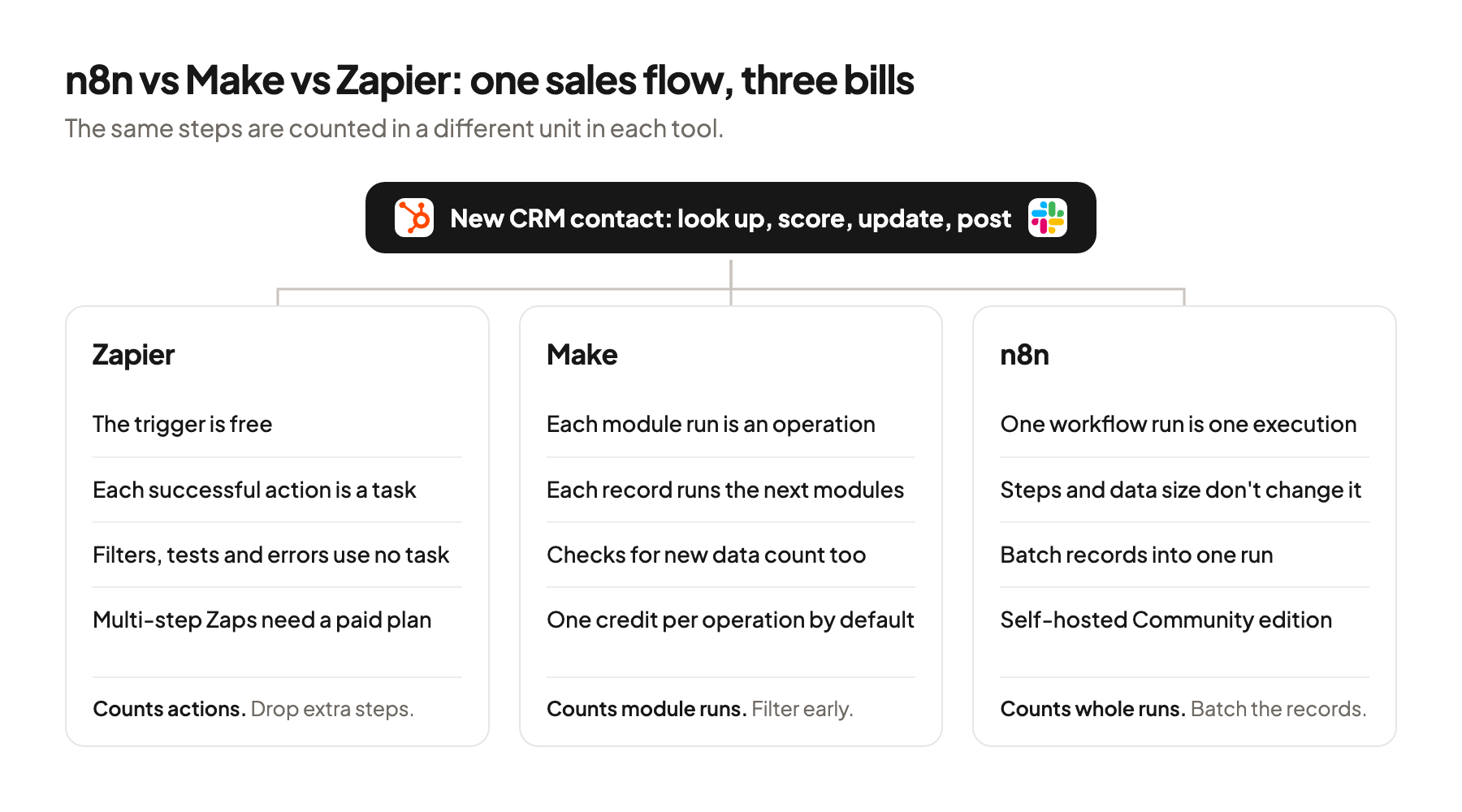
Zapier bills per successful action, Make per module run, and n8n per whole workflow run, regardless of how many steps it has.
Zapier counts tasks. “A task is any successful action that runs in Zapier” (Zapier Help, 2026). Triggers, Filter and Paths steps, Formatter steps, tests and failed actions don’t count. When you reach the limit, Zapier either charges extra tasks or holds new runs until the billing cycle resets, depending on your plan.
Make counts operations, then converts them to credits. “An operation is a single module run to process data or check for new data” (Make Help, 2026). By default one operation equals one credit, and modules with built-in AI connections add token usage. Each bundle, Make’s word for one record moving through the flow, runs every module after it once. Make itself warns that bundles in early modules have “a multiplying effect” on the rest of the scenario.
n8n counts executions. Its pricing page says pricing “is based on monthly workflow executions, regardless of complexity” and that “It doesn’t matter how many steps are in the workflow or how much data it processes.” The self-hosted Community edition has no execution bill, and you pay for the server and the time to run it instead.
Say 500 new contacts reach HubSpot in a month, and each one goes through four actions: look up the company, score it, update the contact and post to Slack. In Zapier that is about 2,000 tasks, since the trigger is free. In Make it is about 2,000 operations for the four modules, plus one operation for every check the trigger makes, even when nothing is new. In n8n it is 500 executions if each contact starts its own run, or about 30 if a daily schedule picks up all new contacts in one run.
The shape of the flow changes the bill more than the tool. Batching helps in n8n, filtering early helps in Make and Zapier. Count the steps of your busiest flow before you compare plans.
The free tiers differ in what they allow. Zapier’s Free plan covers two-step Zaps with one trigger and one action and 100 tasks per month, and its polling triggers check every 15 minutes. Multi-step Zaps need a paid plan, so the four-step flow above does too.
How branching, code and errors compare
All three can branch on rules and handle failed steps, and they differ in how far you can go before you need code.
Zapier branches with Paths. Paths “lets you perform different actions in your Zap based on rules that you define.” Each path group can have up to 10 branches, nested up to 3 levels, on Professional plans and above. For logic beyond that, Code by Zapier runs “small snippets of Python or JavaScript” inside time and memory limits set by your plan.
Make branches with routers. “A router allows you to branch the scenario flow into several chains of modules,” and a fallback route catches the data no other route matches.
n8n treats code as a normal step. The Code node runs “custom JavaScript or Python” as a step in the workflow. In my view, a step with a right answer, such as a score from fixed rules, belongs in code, and the model should not decide it. For the scoring logic itself, see how to score leads without letting the model guess.
| When a step fails | Zapier | Make | n8n |
|---|---|---|---|
| Failed step | Does not use a task | Error handlers: Skip, Retry, Resume, Commit, Rollback | Node setting On Error: stop, continue, or route the error onward |
| Retry | Automatic retries on paid plans | Retry handler stores incomplete runs | Retry On Fail per node |
| Alert on failure | Not compared here | Not compared here | Error workflow that starts with the Error Trigger |
Error handling decides how much you trust a flow that writes to the CRM. Whichever tool you pick, test what happens when the enrichment API returns nothing.
How each one connects to HubSpot and Salesforce
All three ship ready-made HubSpot and Salesforce steps, and each also lets you call an API directly when the ready step is missing.
An API (application programming interface) is how one program asks another for data. A webhook is a message an app sends to a URL when something happens. Upsert means create the record, or update it if it already exists.
Zapier offers HubSpot triggers and actions such as “New Contact” and “Create or Update Contact,” which matches on email address, plus “Create Deal.” Some HubSpot operations need a higher HubSpot plan on your side. Webhooks by Zapier, which lets any app start a Zap, is on paid plans only.
Make’s HubSpot app covers contacts, deals, engagements and form submissions. Modules include “Watch Contacts”, “Create or Update a Contact”, “Search for Contacts” and “Make an API Call” for anything the ready modules don’t cover.
n8n’s HubSpot node creates and updates contacts and searches companies by domain. Its Salesforce node covers accounts, contacts, leads and opportunities, each with an upsert operation. That is the step you want when a flow runs twice on the same lead, because it updates the record instead of creating a duplicate.
Check the exact action before you pick the tool. In my view, the deciding detail is whether your CRM write can match on the field you trust, such as email or domain. Run one test record through each trial and look at the CRM afterward.
How AI agents and MCP reach each tool
All three let an AI assistant run your flows through MCP, and they set different limits on what it can do and how it’s billed.
MCP (Model Context Protocol) is a standard that lets an AI assistant such as Claude or ChatGPT use a tool inside the conversation.
Zapier MCP bills from your task quota. Zapier describes it as “a secure way to connect AI clients such as Claude, ChatGPT, and Cursor to the apps you use through Zapier,” and says “Each tool call uses two tasks from your existing task quota” (Zapier MCP, 2026).
Make’s MCP server runs scenarios you mark for it. It lets clients “view and run activated scenarios with on-demand scheduling” (Make Help, 2026). Running scenarios works on all plans, and the scopes that manage your account need a paid plan.
n8n turns a workflow into an MCP server. The MCP Server Trigger node exists “to allow n8n to act as a Model Context Protocol (MCP) server,” and it only runs the tool nodes you attach. n8n can also ask a human to approve before its AI Agent runs a specific tool.
I’d keep a human between the agent and the CRM in any of the three. In my view, the agent proposes, a person approves and only then does a fixed step write the record. More on connecting assistants to your stack in which Claude Code MCPs to connect and the guide to headless GTM.
How to choose, and when you don’t need an agency
Pick by who will maintain the flows and how they are shaped, then build your busiest flow in each trial.
- Your team has no developer and the flows are short. In my view Zapier is the quickest start. Count actions, since every successful one is a task.
- Your flows branch a lot and you like to see them on a canvas. Make’s routers and error handlers fit. Watch the bundles, since each record runs every module after it.
- You want code steps, batch runs or your own servers. n8n fits. n8n itself recommends self-hosting only for people who can set up, secure and scale a server, and points everyone else to n8n Cloud.
- An AI assistant will trigger the flows. Check how each tool bills a tool call before you connect it.
Write the process down before you automate it. In my view, many teams buy automation before they have decided what the ideal process looks like. Name the owner, the rule for exceptions and what counts as done, and the tool choice gets easier.
You don’t need an agency to pick one of the three. If you run a few flows between one CRM, one sending tool and Slack, a founder or an operator can set up any of these alone, and all three help centers are detailed.
Help makes sense when the flows start to carry the pipeline. That point comes with several data sources, scoring rules, routing and a CRM that has to stay clean. That’s the work Pipecadence does. We build the outbound system in your company on your own tool accounts, so they stay with you. You get weekly numbers in your own tools and a monthly keep, change or stop review, and you can take the whole system over at any time.
Where this usually goes wrong
- Comparing plan prices before counting steps. Count runs and steps of your busiest flow, since tasks, operations and executions measure different things.
- Polling for new records every few minutes in Make. Every check is an operation even when nothing is new, so schedule checks to match how often data really changes.
- Letting a flow create duplicates. Use the create-or-update action that matches on email or domain, and run the same test record twice.
- Leaving failures silent. Set an error handler in Make or an error workflow in n8n before the flow writes to the CRM.
- Giving an AI assistant direct CRM writes. Keep an approval step between the agent’s proposal and the write.
Where to start
Write your busiest sales flow on one page: the trigger, every step and how many records pass through in a month. Build that flow in a trial of each tool and compare what each one would bill.
n8n vs Make vs Zapier comes down to how your flows are shaped and who maintains them: Zapier for quick, short flows, Make for visual branching, n8n for code and self-hosting. If you’d like a second opinion on your setup before you commit, book a 30-minute system check.
Pick your next step
Build it yourself
If you have the time to build and maintain it. The guide walks through every step.
Get the free target market map
If you haven't run outbound yet. Your market, its buying signals and who to contact first.
Book a system check
If you want it built in your own tools. 30 minutes on your market, outbound and sales capacity.
FAQ
Is n8n better than Make or Zapier?
None of them is better in general. n8n suits teams that want code steps or self-hosting. Make suits visual flows with many branches, and Zapier suits short flows that someone without code has to maintain.
What is the main difference between Zapier and Make?
They count usage differently. Zapier counts each successful action as a task and never counts triggers. Make counts every module run as an operation, including each check for new data.
What does Reddit say about Zapier vs Make?
Reddit threads on Zapier vs Make are user opinions, and they age as both tools change plans. I’d use them for questions to test in your own trial.
Is n8n free?
The self-hosted Community edition runs without a license key, so there’s no execution bill. You still pay for the server and the time it takes to secure and update it. n8n Cloud is billed by executions per month.
Which tool works best with HubSpot?
All three have HubSpot steps for creating or updating contacts and deals. Make and n8n also let you call the HubSpot API directly when a ready step is missing. Test the exact action you need with one record.
Can I switch tools later?
Yes, with work. You rebuild each flow in the new tool and test it again. Keep your scoring rules and field mappings written down outside the tool.
Sources (26)
- Learn key concepts in Zapier, Zapier Help
- How is task usage measured in Zapier, Zapier Help
- What’s included in Zapier’s Free plan, Zapier Help
- Add branching logic to Zaps with Paths, Zapier Help
- Use Python code in Zaps, Zapier Help
- Trigger Zaps from webhooks, Zapier Help
- HubSpot integrations, Zapier
- Zapier MCP, Zapier
- What’s a scenario and which type should you use, Make Help
- Operations, Make Help
- Credits, Make Help
- Router, Make Help
- Error handlers, Make Help
- Schedule a scenario, Make Help
- Make MCP server, Make Help
- HubSpot CRM app, Make
- Executions, n8n Docs
- Hosting n8n, n8n Docs
- Docker installation, n8n Docs
- Code node, n8n Docs
- Node settings, n8n Docs
- Error handling, n8n Docs
- HubSpot node, n8n Docs
- Salesforce node, n8n Docs
- MCP Server Trigger node, n8n Docs
- Human-in-the-loop for AI tool calls, n8n Docs